
A Linux systems administrator is running an important maintenance task that consumes a large amount of CPU, causing other applications to slow. Which of the following actions should the administrator take to help alleviate the issue?
Correct Answer:
B
Process scheduling and resource management are essential Linux administration skills covered in Linux+ V8. When a process consumes excessive CPU resources, it can negatively impact overall system performance.
The correct solution is tolower the priorityof the CPU-intensive task using the renice command. Niceness values influence how much CPU time a process receives relative to others. Increasing the niceness value reduces the process??s priority, allowing other applications to receive CPU resources more fairly.
OptionBdirectly addresses the issue. The other options do not. pidstat monitors processes but does not modify CPU allocation. nohup allows a process to continue running after logout but does not affect scheduling priority. bg resumes a stopped job in the background but does not reduce CPU usage.
Linux+ V8 documentation explicitly references nice and renice for managing CPU contention. Therefore, the correct answer isB.
A systems administrator manages multiple Linux servers and needs to set up a reliable and secure way to handle the complexity of managing event records on the OS and application levels. Which of the following should the administrator do?
Correct Answer:
B
Log management is a critical system management function highlighted in CompTIA Linux+ V8, particularly in multi-server environments. As the number of systems and applications grows, managing logs locally on each server becomes inefficient and error-prone.
The best solution is toimplement a centralized log aggregation solution, making optionBcorrect. Centralized logging collects logs from multiple systems and applications into a single, secure location. This simplifies monitoring, searching, correlation, auditing, and incident response. Common solutions include syslog servers, ELK/EFK stacks, and SIEM platforms.
Linux+ V8 documentation emphasizes centralized logging as a best practice for availability, troubleshooting, and security analysis. It enables administrators to detect patterns, investigate incidents, and maintain compliance more effectively than isolated log files.
The other options are insufficient on their own. On-demand retrieval does not scale well. Log backups protect data but do not simplify analysis. Log rotation manages disk usage but does not address distributed log complexity.
Therefore, the correct answer isB. Implement a centralized log aggregation solution.
A junior system administrator removed an LVM volume by mistake.
INSTRUCTIONS
Part 1
Review the output and select the appropriate command to begin the recovery process.
Part 2
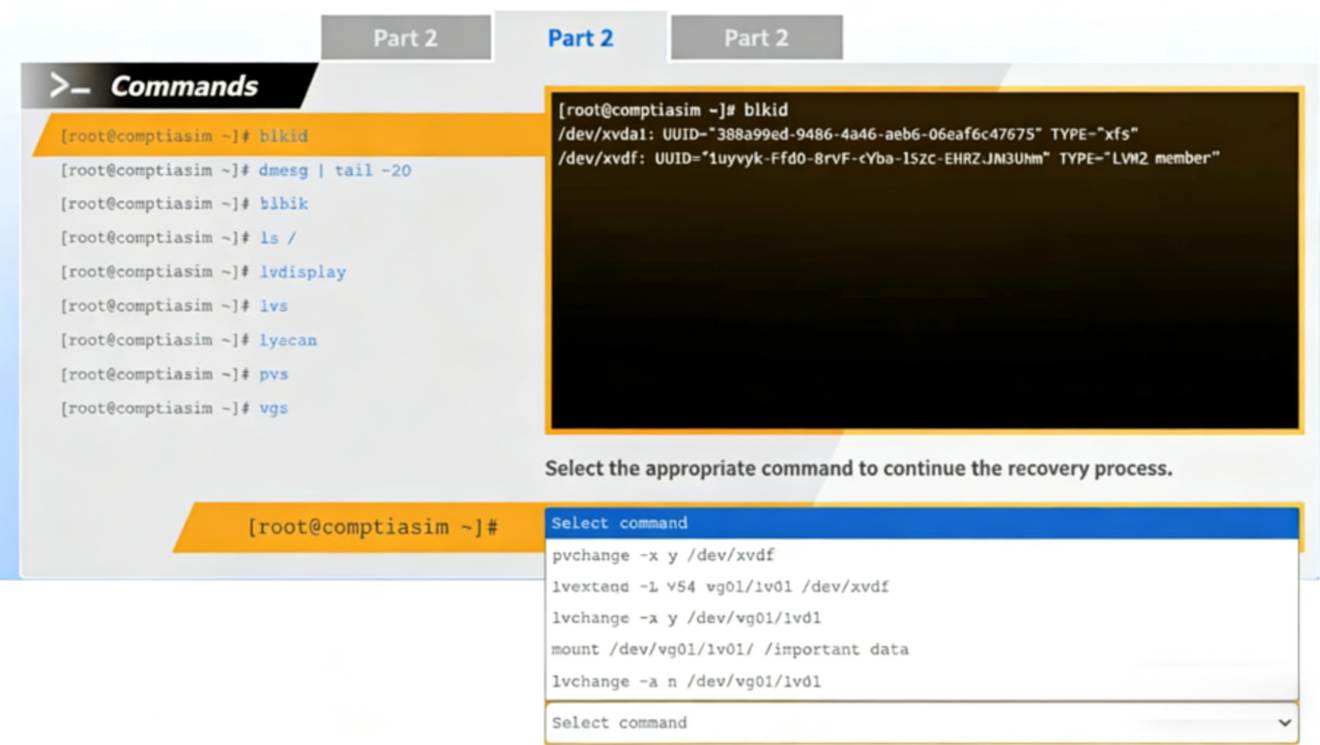
Review the output and select the appropriate command to continue the recovery process.
Part 3
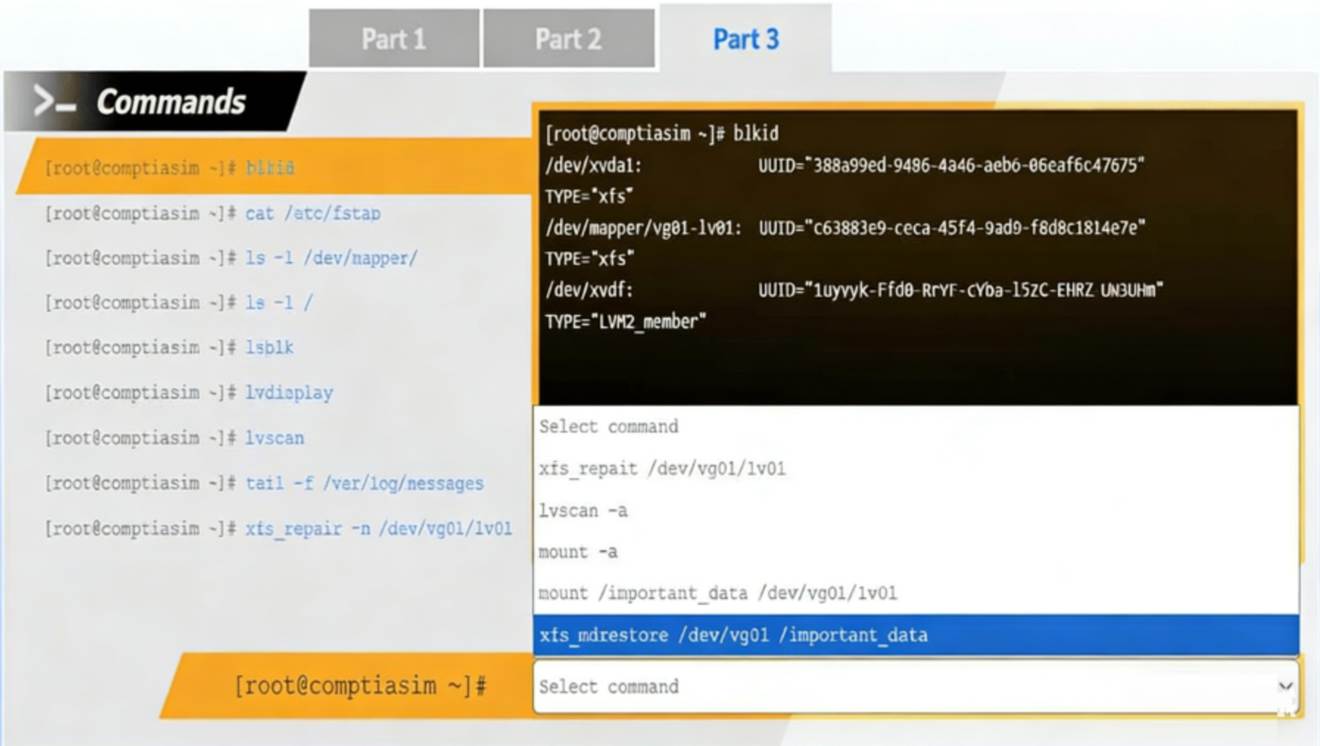
Review the output and select the appropriate command to complete the recovery process and access the underlying data.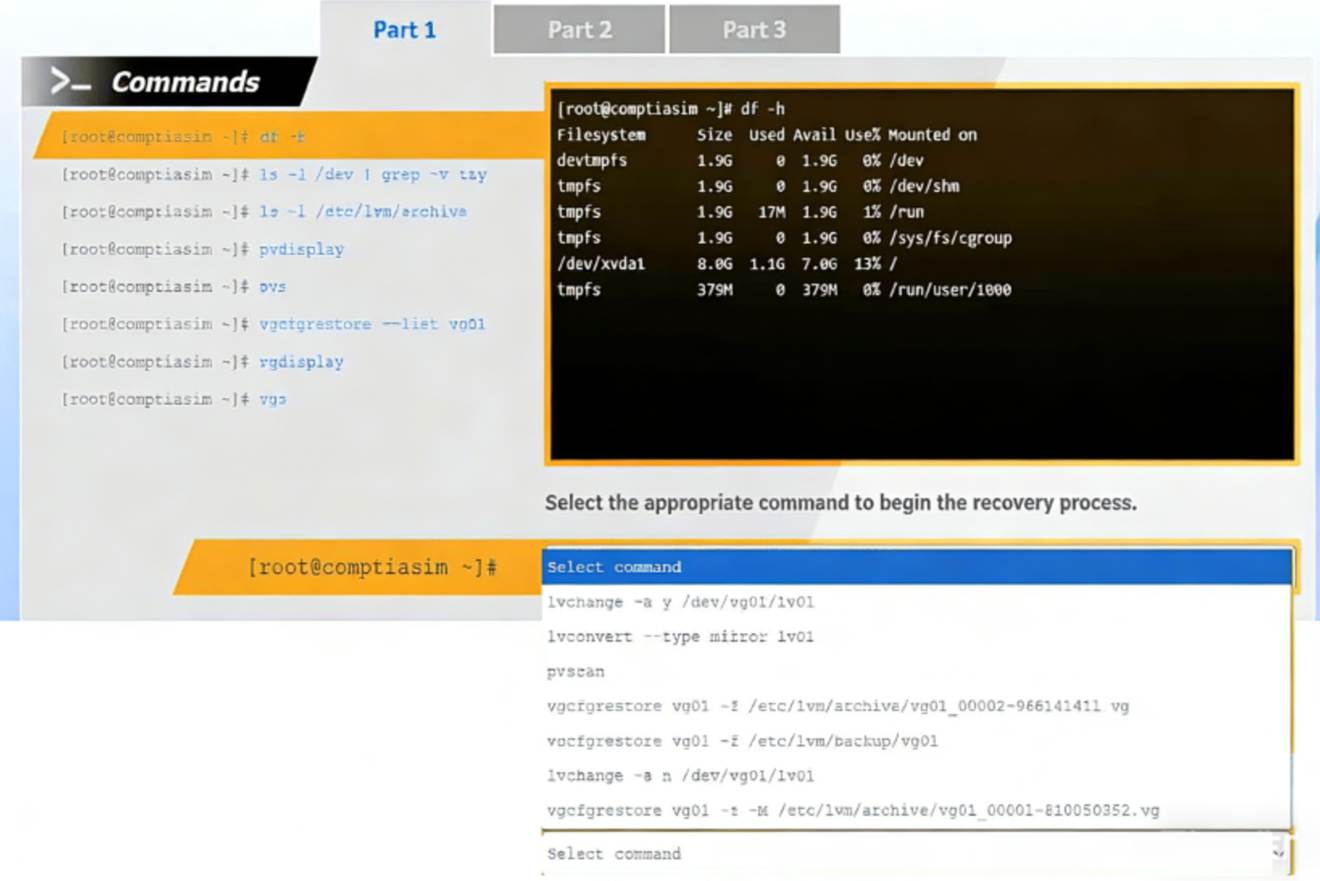
Solution:
Part 1 – Begin the recovery process Answer
vgcfgrestore vg01 -f /etc/lvm/archive/vg01_00001-810050352.vg
Part 2 – Continue the recovery process Answer
lvchange -ay /dev/vg01/lv01
Part 3 – Complete recovery and access data Answer
mount /dev/vg01/lv01 /important_data
This performance-based question tests LVM recovery, a critical System Management skill in CompTIA Linux+ V8. The scenario indicates that a logical volume was removed, but the underlying physical volume and volume group metadata still exist.
# Part 1: Restoring Volume Group Metadata
The first screenshot shows that:
* Physical volumes (pvdisplay, pvs) still exist
* The logical volume is missing
* /etc/lvm/archive/ contains archived VG metadata
Linux automatically stores backups of LVM metadata in /etc/lvm/archive whenever changes are made. The correct first step is to restore the volume group metadata using:
vgcfgrestore vg01 -f /etc/lvm/archive/vg01_00001-810050352.vg
This restores the logical volume definitions but does not activate them yet.
This is the only correct starting point in Linux+ V8 recovery workflows.
# Part 2: Activating the Logical Volume
After metadata restoration:
* The LV exists but is inactive
* blkid shows the LV as TYPE="LVM2_member"
The logical volume must be activated before it can be mounted: lvchange -ay /dev/vg01/lv01
This makes the LV available under /dev/vg01/lv01. Linux+ explicitly requires LV activation after recovery.
# Part 3: Accessing the Data
The final output shows:
* The filesystem type is xfs
* The logical volume is now visible
Since there is no indication of filesystem corruption, no repair is required.
The correct final step is to mount the filesystem: mount /dev/vg01/lv01 /important_data
This restores full access to the underlying data.
Does this meet the goal?
Correct Answer:
A
A Linux administrator needs to securely erase the contents of a hard disk. Which of the following commands is the best for this task?
Correct Answer:
B
Secure data destruction is an important security requirement addressed in Linux+ V8 objectives. When data must be permanently erased, standard file deletion commands are insufficient because they do not overwrite the data on disk.
The shred command is specifically designed to securely erase files or block devices by overwriting them multiple times with random data. Using sudo shred /dev/sda1 overwrites the entire partition, making data recovery extremely difficult or impossible. This aligns directly with Linux+ V8 best practices for secure data sanitization.
The other options are incorrect. rm -rf removes directory entries but does not overwrite disk data. parted rm deletes partition entries but leaves the underlying data intact. dd if=/dev/null writes zero bytes and does not overwrite existing data blocks.
Linux+ V8 documentation identifies shred as the most appropriate tool for secure erasure when compliance or confidentiality is required. Therefore, the correct answer isB.
An administrator attempts to install updates on a Linux system but receives error messages regarding a specific repository. Which of the following commands should the administrator use to verify that the repository is installed and enabled?
Correct Answer:
D
Package management troubleshooting is an important skill in Linux+ V8, especially on RPM-based distributions that use yum or dnf. When update errors reference a repository, the administrator must verify whether the repository exists and whether it is enabled.
The command yum repolist all displays all configured repositories, including those that are enabled, disabled, or temporarily unavailable. This makes it the most effective command for diagnosing repository-related issues. It allows administrators to quickly confirm the repository??s status and take corrective action, such as enabling it or fixing configuration errors.
The other options are incorrect. yum repo-pkgs manages packages within a repository but does not list repository status. yum list installed repos is not a valid yum command. yum reposync is used to mirror repositories locally and is not intended for verification.
Linux+ V8 documentation highlights yum repolist all as the standard command for repository inspection and troubleshooting.
Therefore, the correct answer is D. yum repolist all.
