
Which two statements about 802.1X authentication on FortiSwitch ports are true? (Choose two.)
Correct Answer:
AD
All hosts behind an authenticated port are allowed access after a successful authentication (A): Once a device on a port successfully authenticates using 802.1X, all other devices connected behind that port also gain network access. This is typical in scenarios where a switch is behind an authenticated port and not each device individually authenticates.
All devices connecting to FortiSwitch must support 802.1X authentication (D): For a network secured with 802.1X, all devices attempting to connect through the FortiSwitch must support and participate in 802.1X authentication to gain access. This ensures that all devices on the network are authenticated before they are allowed to communicate on the network.
Refer to the configuration: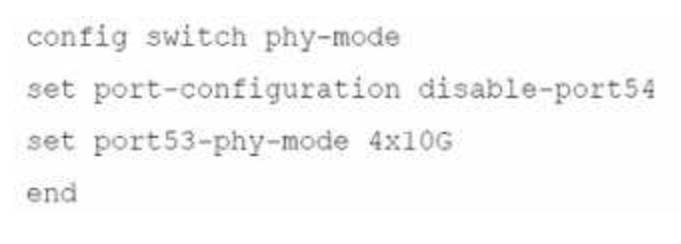
Which two conditions does FortiSwitch need to meet to successfully configure the options shown in the exhibit above? (Choose two.)
Correct Answer:
BD
The configuration provided involves adjusting the physical (PHY) mode of the ports on a FortiSwitch, including disabling a port and reconfiguring another for a different speed. The conditions needed for this configuration to be successful include:
FortiSwitch would need to be rebooted (B):
Reboot Requirement:Changes to the physical mode of ports, particularly when involving high-speed interfaces or changes that affect the operational mode of the hardware, typically require a reboot to apply the new configuration correctly.
The port full speed prior to the split was 100G QSFP+ (D):
Hardware Capabilities:Configuring port 53 to operate at 4x10G suggests that the original configuration supported a high throughput, such as 100GQSFP+. This configuration is typical in switches that support breaking down a high-capacity port into smaller units.
References:For more specific guidelines on port configuration and PHY mode settings in FortiSwitch devices, refer to the hardware installation and configuration manuals available at:Fortinet Product Documentation
What are two ways in which automatic MAC address quarantine works on FortiSwitch? (Choose two.)
Correct Answer:
BD
Automatic MAC address quarantine is a security feature within the FortiGate/FortiSwitch integration. Here's how it works and why the answers are correct: The Role of FortiGate:FortiGate is the central decision point for quarantine actions. It identifies suspicious MAC addresses and communicates quarantine instructions to the FortiSwitch. The FortiSwitch doesn't make quarantine decisions on its own. Quarantine Mechanisms:While the decision is made on FortiGate, FortiSwitch supports two ways to enforce the quarantine: VLAN Quarantine Mode:In this mode, the FortiSwitch moves the quarantined MAC address into a dedicated quarantine VLAN. This isolates the device.exclamation Port Quarantine Mode:The FortiSwitch disables the physical port where the quarantined MAC address is detected. Configuration:Enabling MAC address quarantine involves configuring parameters on the FortiGate, notably via the CLI but also through the GUI depending on your FortiOS version.
Why the Other Options are Incorrect: A. FortiSwitch supports only by VLAN quarantine mode.This is incorrect. FortiSwitch can use both VLAN-based and port-based quarantine methods. C. FortiAnalyzer with a threat detection services license is required.FortiAnalyzer can provide deeper analysis and logging, but it's not mandatory for the core functionality of MAC address quarantine.
References: Fortinet Document Library - FortiSwitch Quarantines:https://docs.fortinet.com/document/fortiswitch/7.4.2/fortilink-guide/173282/quarantines Fortinet Document Library - Configuring Switch Controller Quarantine (CLI):https://docs.fortinet.com/document/fortigate/7.2.8/cli-reference/211620/config-switch-controller-qu
Refer to the diagnostic output:
What makes the use of the sniffer command on the FortiSwitch CLI unreliable on port 23?
Correct Answer:
D
The use of the sniffer command on FortiSwitch CLI can be unreliable on port 23 for specific reasons related to the nature of traffic on the port:
D.T switch port might be used as a trunk member.When a switch port is configured as a trunk, it can carry traffic for multiple VLANs. If the sniffer is set up without specifying VLAN tags or a range of VLANs to capture, it may not accurately capture or display all the VLAN traffic due to the volume and variety of VLAN-tagged packets passing through the trunk port. This limitation makes using the sniffer on a trunk port unreliable for capturing specific VLAN traffic unless properly configured to handle tagged traffic.
References: For guidelines on how to properly use sniffer commands on trunk ports and configure VLAN filtering, consult the FortiSwitch CLI reference available through Fortinet support channels, including theFortinet Knowledge Base.
Refer to the exhibit.
Which two statements best describe what is displayed in the FortiLink debug output shown in the exhibit? (Choose two.)
Correct Answer:
AB
The provided debug output indicates that the FortiSwitch is sending FortiLink heartbeats to the FortiGate and is currently waiting to join the stack group. Here's a breakdown of the relevant lines:
Line 1:Shows the date, time, elapsed time since boot, and process ID for the FortiLink event handler.
Event 101:This indicates the FortiSwitch is in a "wait join" state (FL_STATE_WAIT_JOIN). This means it's discovered by the FortiGate and is awaiting further instructions to join the FortiLink stack group.
switchname S424DPTF20000029:This displays the serial number of the FortiSwitch.
flags 0x401:The specific flag meaning might depend on the FortiSwitch model and version, but it likely indicates general communication between the switch and FortiGate.
Lines 2 and onward:These lines show subsequent events with similar timestamps, suggesting a regular heartbeat interval. There are also instances of the FortiSwitch sending packets to the FortiGate (indicated bypkt-sent).
Why the Other Options Are Less Likely:
* C. FortiSwitch is discovered and authorized by FortiGate.While discovery might have happened before these lines, the "wait join" state suggests authorization hasn't necessarily completed yet.
* D. FortiSwitch is ready to push its new hostname to FortiGate.There's no explicit indication of hostname changes in this excerpt. The focus is on joining the stack group.
In Summary:
The key point is the "FL_STATE_WAIT_JOIN" state, which signifies the FortiSwitch is ready to be fully integrated but is waiting for further commands from the FortiGate to complete the process.
