
Refer to the exhibits.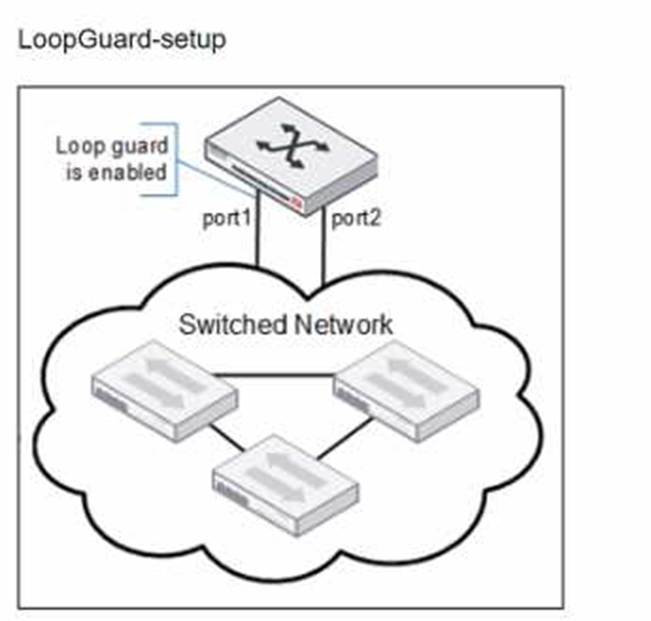
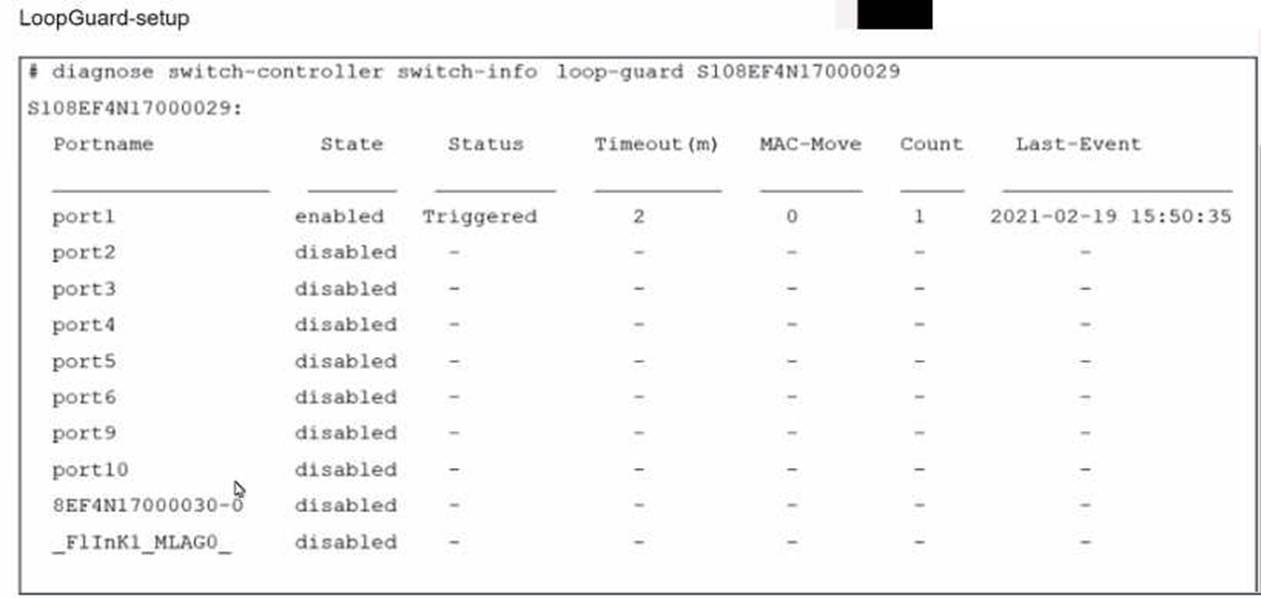
Port1 and port2 are the only ports configured with the same native VLAN 10. What are two reasons that can trigger port1 to shut down? (Choose two.)
Correct Answer:
AB
When loop guard is enabled on port1 and port2 configured with the same native VLAN (VLAN 10), there are specific scenarios under which port1 can be shut down due to loop guard operation:
A.port1 was shut down by loop guard protection.Loop guard is a specific feature used in network environments to prevent alternative or redundant loops. When loop guard is active, it can shut down a port if it stops receiving BPDU (Bridge Protocol Data Units) on a port that is expected to receive them, assuming a loop or link failure and putting the port into an inconsistent state to prevent potential loops.
B.STP triggered a loop and applied loop guard protection on port1.If the Spanning Tree Protocol (STP) detects a loop or loss of BPDU transmissions while loop guard is enabled, it will proactively shut down the port to prevent network instability or a broadcast storm. This is an essential function of loop guard within the context of STP, providing additional protection against topology changes that could introduce loops.
References: Additional details about loop guard functionality and STP interaction can be found in the FortiSwitch administration guides, accessible viaFortinet Documentation.
Refer to the diagnostic output: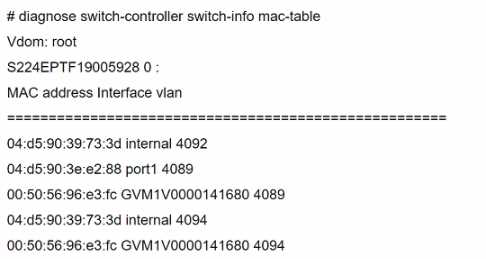
Two entries in the exhibit show that the same MAC address has been used in two different VLANs. Which MAC address is shown in the above output?
Correct Answer:
B
The MAC address "00:50:56:96:e3:fc" appearing in two different VLANs (4089 and 4094) in the diagnostic output indicates it is a MAC address associated with a device that supports traffic from multiple VLANs. Such a behavior is typical of network infrastructure devices like switches or routers, which are configured to allow traffic from various VLANsto pass through a single physical or logical interface. This is essential in network designs that utilize VLANs to segregate network traffic for different departments or use cases while using the same physical infrastructure.
References:
For more detailed information on MAC table diagnostics and VLAN configurations in FortiGate devices, refer to the official Fortinet documentation:Fortinet Product Documentation.
Which two statements about managing a FortiSwitch stack on FortiGate are true? (Choose two.)
Correct Answer:
AB
A FortiLink interface must be enabled on FortiGate (A): To manage a FortiSwitch stack, a dedicated FortiLink interface on the FortiGate is required. This interface is used to manage the communication between FortiGate and the FortiSwitch stack, enabling centralized control and configuration of the switches directly from the FortiGate.
The switch controller feature must be enabled on FortiGate (B): Enabling the switch controller feature on FortiGate allows it to manage connected FortiSwitch units. This feature provides tools and interfaces on the FortiGate for overseeing FortiSwitch configurations, monitoring switch status, and managing network policies across the stack.
Which two statements about VLAN assignments on FortiSwitch ports are true? (Choose two.)
Correct Answer:
CD
VLAN assignments on FortiSwitch ports must follow certain rules and guidelines to ensure network integrity and proper traffic segregation:
Only Assign One Native VLAN on a Port (C):
Assign Untagged VLANs Using FortiGate CLI (D):
References:For detailed instructions and best practices on VLAN configuration on FortiSwitch, refer to the FortiSwitch administration guide available on:Fortinet Product Documentation
Which packet capture method allows FortiSwitch to capture traffic on trunks and management interfaces?
Correct Answer:
C
