
DRAG DROP - (Topic 3)
You have enabled Dynamics 365 App for Outlook for your sales team.
Users report that they are dissatisfied that they must track the emails manually, so you propose folder-level tracking.
You need to enable folder-level tracking in your environment in order for your users to configure the rules.
Which three actions should you perform in sequence before saving your changes? To answer, move the three appropriate actions from the list of actions to the answer area. Arrange the three actions int he correct order.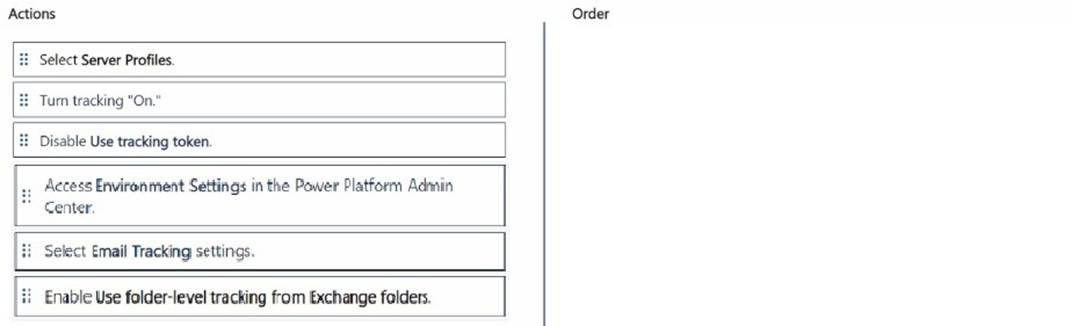
Solution:
✑ Access Environment Settings in the Power Platform Admin Center:
Does this meet the goal?
Correct Answer:
A
HOTSPOT - (Topic 3)
You are configuring Dynamics 365 Sales as part of a new implementation at your organization. Your organization has Sales Professional licensing.
Your organization sells over 100 different types of products across different divisions. A lot of selling occurs at conferences where sellers meet prospects and gather business cards to create leads.
After reviewing the requirements from your business stakeholders, you identify that:
* 1. Sellers sometimes only want to convert leads gathered at events to contacts before they start tracking any deals with that contact.
* 2. Sellers must be given multiple different options for specifying the final status of deals they have been tracking.
Your current System Settings is as follows: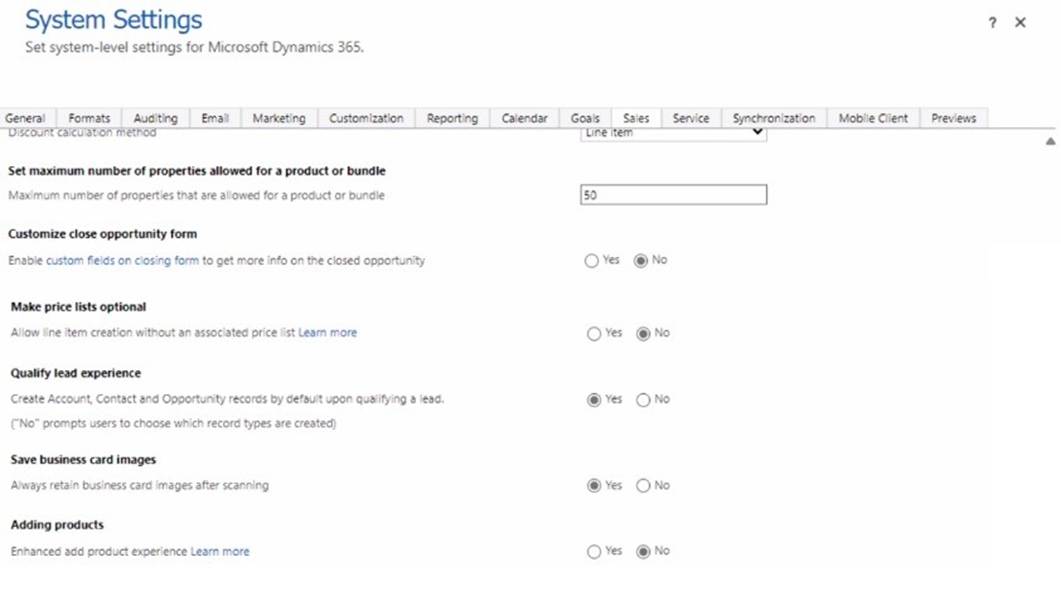
Use the drop-down menus to select the answer choice that answers each question. NOTE: Each correct selection is worth one point.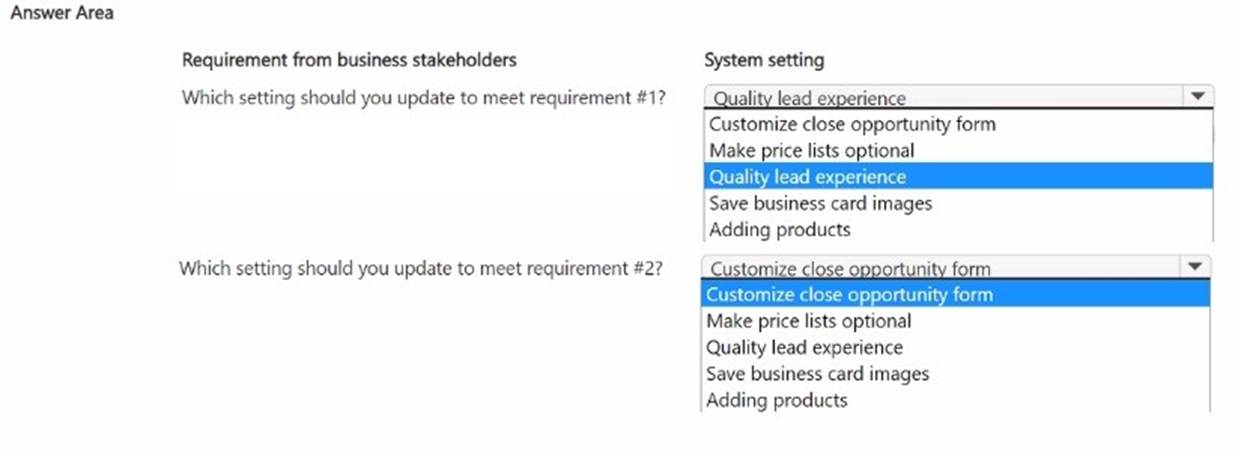
Solution: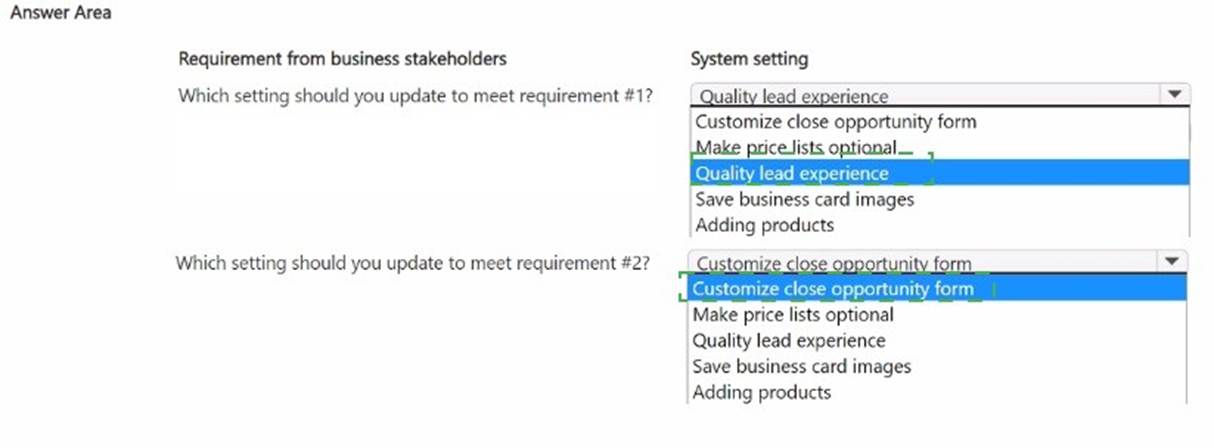
Does this meet the goal?
Correct Answer:
A
HOTSPOT - (Topic 2)
BDM1 has returned from vacation and needs to catch up on their scheduled tasks and activities.
Which two items can BMD1 select to see a reminder card for the meeting BDM2 scheduled in the assistant? To answer, select the appropriate options in the answer area.
NOTE: Each correct selection is worth one point.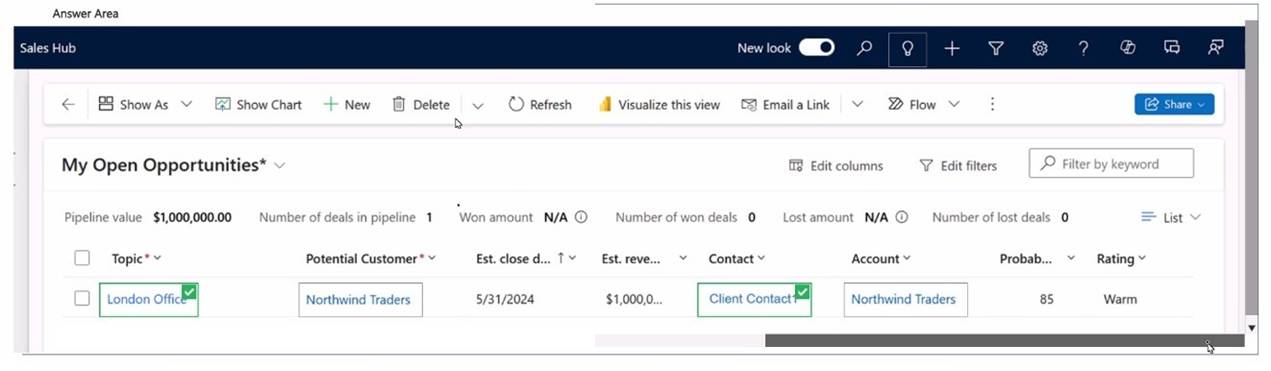
Solution:
✑ Show As
✑ Visualize this view
To catch up on scheduled tasks and activities, BDM1 can use specific features in the Dynamics 365 Sales Hub interface. Here??s how they work in this scenario:
✑ Show As:
✑ Visualize this view:
Microsoft Dynamics 365 References:
✑ Using assistant cards in Dynamics 365 Sales
✑ Configuring views and visualizations in Dynamics 365
By selecting these options, BDM1 can effectively access and view the assistant card related to the scheduled meeting, facilitating a quick catch-up on all pending activities.
Does this meet the goal?
Correct Answer:
A
- (Topic 3)
A large construction company uses Dynamics 365 Sales to manage their sales pipeline.
All future jobs are logged in the system as opportunities. Depending on the type o( work, some opportunities close faster, and others take longer due to dependency on the third- party vendors.
The sales team does NOT currently use the "On hold* option, as it does NOT provide enough details.
When working with open opportunities, the sales manager wants to know whether opportunities are pending permits or require asbestos removal.
You need to ensure that a salesperson can only select the "Pending Permits" or "Asbestos Removal" option when working with their opportunities to indicate the deal is taking longer.
What should you do?
Correct Answer:
A
✑ Understanding the Statuscode and Statecode Columns:
Reference:Microsoft Documentation - Statecode and Statuscode in Dynamics 365
Modifying Status Reasons for Open Opportunities:
The construction company wants to indicate when opportunities are delayed due to specific external factors. To accommodate this, they need specific status reasons like "Pending Permits" and "Asbestos Removal."
By adding these as status reasons under the "Open" state, you enable sales team members to select these options directly from their current status options.
Reference:Microsoft Documentation - Customize Status Reasons for Opportunity
Steps to Add New Status Reasons to Open Opportunities:
Navigate to Solution:Go to the Dynamics 365 Sales app, then to Settings > Customizations > Customize the System.
Locate the Opportunity Entity:In the default solution, find and expand the "Entities" list, then select "Opportunity."
Edit Statuscode Values:Within the "Opportunity" entity, select "Fields," then find and edit the statuscode field. Here, you can add new options under the "Open" status. Add "Pending Permits" and "Asbestos Removal."
Publish the Changes:After adding and saving the new status reasons, publish the changes so that they are available to users.
Verifying Custom Status Reason Visibility:
Ensure the new options are available on the Opportunity form for selection.
Test by opening an Opportunity and confirming that the "Pending Permits" and "Asbestos Removal" options are available under the Open status reasons.
Reference:Microsoft Documentation - Publishing Customizations in Dynamics 365
By following these steps, the sales team can now use specific status reasons to indicate why certain opportunities are delayed, providing clearer visibility into the sales pipeline's status.
- (Topic 3)
The assistant to the sales leader has some questions on how delegation works when using the Dynamics 365 App for Outlook. They want to know how columns are populated when an email is tracked.
You need to explain the behavior of the tracked email messages, in particular, what is set as the owner of the tracked email from a delegated mailbox.
What should you convey?
Correct Answer:
D
When an email is tracked in Dynamics 365 from a delegated mailbox, the primary mailbox owneris set as the owner of the tracked email. This means that if an assistant sends or tracks an email on behalf of another user, the email??s ownership will reflect the primary mailbox owner rather than the delegate.
This behavior ensures that activities are correctly associated with the user who owns the mailbox, aligning with the ownership structure in Dynamics 365.
Reference:Microsoft Documentation - Delegate Access and Email Tracking in Dynamics 365
