
DRAG DROP - (Topic 3)
A company uses Dynamics 365 Sales to manage product lines.
You need to set up the product catalog, including the ability for sellers to apply quantity discounts.
In which order should you perform the actions? To answer, move all actions from the list of actions to the answer area and arrange them in the correct order.
NOTE: More than one order of answer choices is correct. You will receive credit for any of the correct orders you select.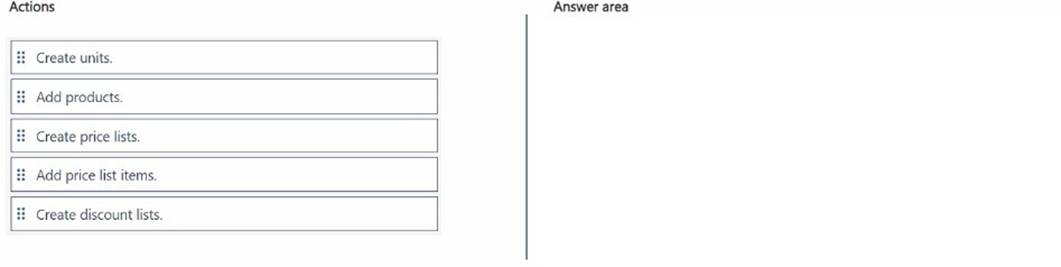
Solution:
The correct order of actions to set up a product catalog, including the ability for sellers to apply quantity discounts, is as follows:
✑ Create units.
✑ Add products.
✑ Create price lists.
✑ Add price list items.
✑ Create discount lists.
✑ Create Units:
Does this meet the goal?
Correct Answer:
A
HOTSPOT - (Topic 3)
A sales manager wants to set up goals for all salespeople. The goal measurement is based on the total outgoing calls finished each year. The goals for the fiscal year are based on a calendar year (January - December).
You need to create the rollup query for the goal metrics.
Which option should you select? To answer, select the appropriate options in the answer area.
NOTE: Each correct selection is worth one point.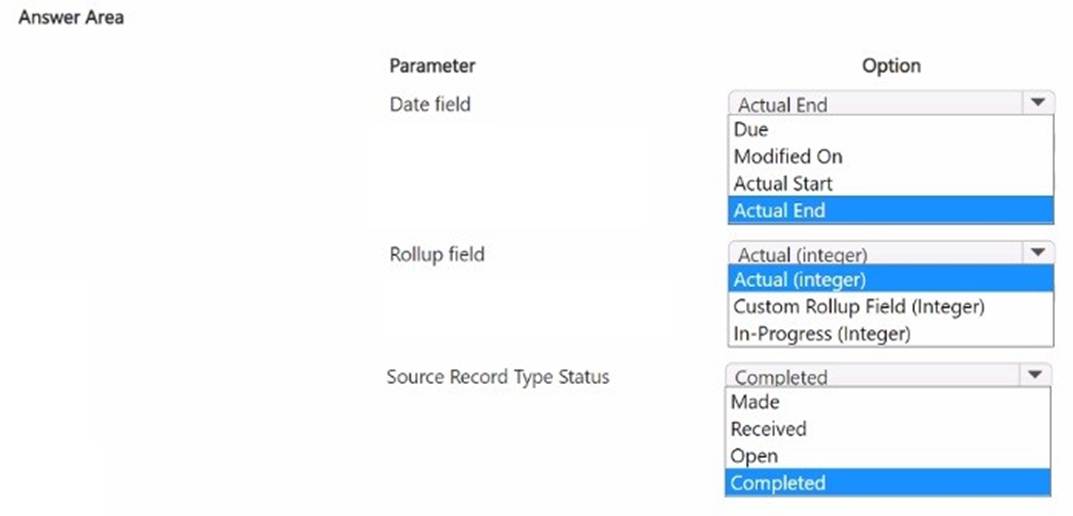
Solution:
A white background with black text Description automatically generated
✑ Date Field - Actual End:
Does this meet the goal?
Correct Answer:
A
DRAG DROP - (Topic 3)
You are designing the user experience for sales users at your organization for a variety of tasks.
One of the user experience requirements is for sales users to be able to see information from custom attributes created for originating leads for opportunities WITHOUT having to navigate to the Lead record.
You are already signed in to the correct editing application and you now need to configure the user experience in Dynamics 365 Sales to enable this.
Which five actions should you perform in sequence before saving and publishing your changes? To answer, move the five appropriate actions from the list of actions to the answer area. Arrange the five actions in the correct order.
NOTE: More than one order of answer choices is correct. You will receive credit for any of the correct orders you select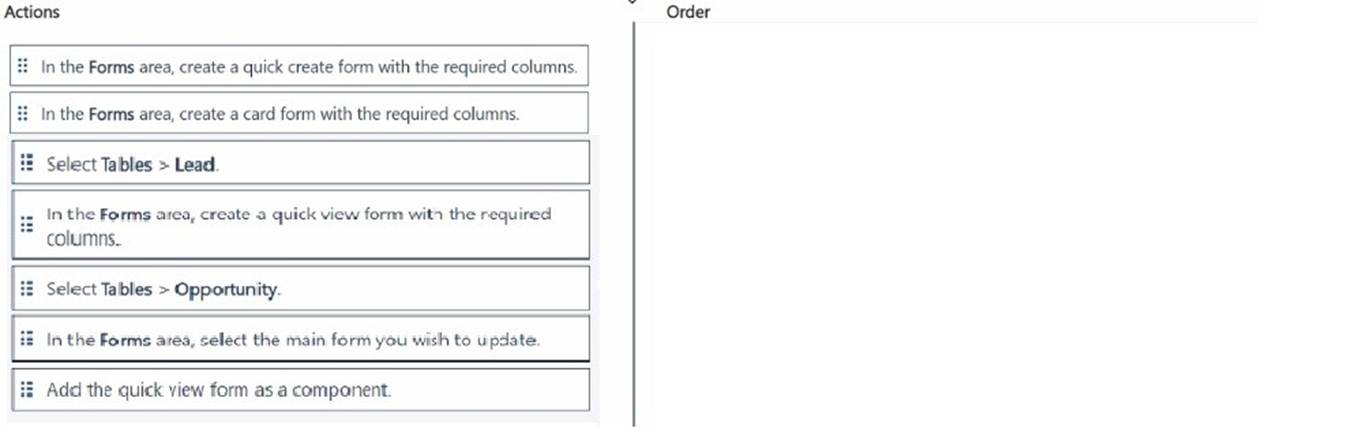
Solution:
A screenshot of a computer
Description automatically generated
The correct order of actions to enable sales users to view information from custom attributes on leads directly within opportunity records, without navigating to the lead record, is as follows:
✑ Select Tables > Lead.
✑ In the Forms area, create a quick view form with the required columns.
✑ Select Tables > Opportunity.
✑ In the Forms area, select the main form you wish to update.
✑ Add the quick view form as a component.
Step by Step Comprehensive Detailed Explanation with ALL Microsoft Dynamics 365 References:
✑ Select Tables > Lead:
Does this meet the goal?
Correct Answer:
A
- (Topic 3)
The remote sales workforce of your organization has been using the integrated Teams chat to collaborate internally. To save time, you indicate to the sales leader that suggested contacts can be displayed when a seller starts a new connected chat.
The sales leader asked you to configure the ability to use suggested contacts.
Which three users can you use as a rule for suggesting contacts? Each correct answer presents a complete solution. Choose three.
NOTE: Each correct selection is worth one point.
Correct Answer:
ACD
✑ Manager on System User Record:
✑ Record Owner of the Initiating Record:
✑ Created By of the Initiating Record:
Reference:Microsoft Documentation - Configure Suggested Contacts for Dynamics 365 and Teams
These selections align with the rules typically used for suggesting contacts in integrated Teams chats, ensuring relevant parties are automatically suggested based on record associations and user relationships.
DRAG DROP - (Topic 3)
The sellers at your organization are keen to adopt generative Al capabilities and use them efficiently.
They have been editing Contact records directly in Copilot for Sales and have now provided feedback that they would be more productive if they could also edit Account records directly in Copilot for Sales.
However, the vice president of sales does NOT want the sellers to be able to edit the "Revenue Forecast" field in Copilot for Sales.
You need to enable these requirements.
Which four actions should you perform in sequence? To answer, move the four appropriate actions from the list of actions to the answer area. Arrange the four actions in the correct order.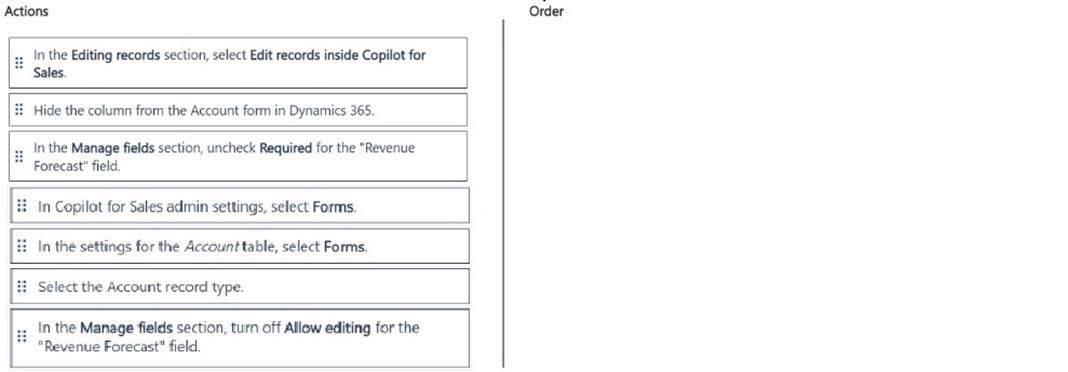
Solution:
The correct order of actions to configure the editing capabilities for the Account records in Copilot for Sales while restricting the "Revenue Forecast" field is as follows:
✑ In Copilot for Sales admin settings, select Forms.
✑ In the settings for the Account table, select Forms.
✑ Select the Account record type.
✑ In the Manage fields section, turn off Allow editing for the "Revenue Forecast" field.
Step by Step Comprehensive Detailed Explanation with ALL Microsoft Dynamics 365 References:
✑ In Copilot for Sales Admin Settings, Select Forms:
✑ In the Settings for the Account Table, Select Forms:
✑ Select the Account Record Type:
✑ In the Manage Fields Section, Turn Off Allow Editing for the "Revenue Forecast" Field:
Does this meet the goal?
Correct Answer:
A
