
Exhibit.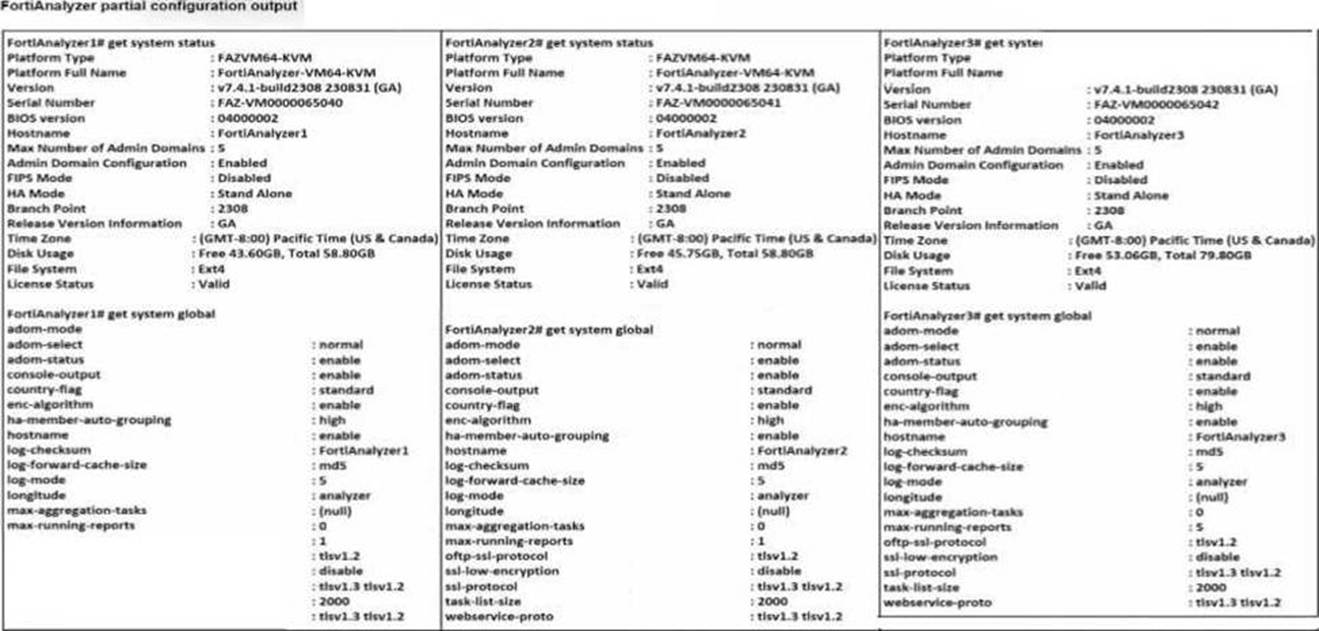
Based on the partial outputs displayed, which devices can be members of a FotiAnalyzer Fabric?
Correct Answer:
D
In a FortiAnalyzer Fabric, devices can participate in a cluster or grouping if they meet specific compatibility criteria.
Based on the outputs provided, let's evaluate these criteria:
Version Compatibility:
All three devices, FortiAnalyzer1, FortiAnalyzer2, and FortiAnalyzer3, are running version v7.4.1-build0238, which is the same across the board. This version alignment is crucial because FortiAnalyzer Fabric requires that devices run compatible firmware versions for seamless communication and management.
Platform Type and Configuration:
All three devices are configured as Standalone in the HA mode, which allows them to operate independently but does not restrict their participation in a FortiAnalyzer Fabric. Each device is also on the FAZVM64-KVM platform type, ensuring hardware compatibility.
Global Settings:
Key settings such as adm-mode, adm-status, and adom-mode are consistent across all devices (adm-mode: normal, adm-status: enable, adom-mode: normal), which aligns with requirements for fabric integration and role assignment flexibility.
Each device also has the log-forward-cache-size set, which is relevant for forwarding logs within a fabric environment.
Based on the above analysis, all devices (FortiAnalyzer1, FortiAnalyzer2, and FortiAnalyzer3) meet the requirements to be part of a FortiAnalyzer Fabric.
Reference: FortiAnalyzer 7.4.1 documentation outlines that devices within a FortiAnalyzer Fabric should be on the same or compatible firmware versions and hardware platforms, and they must be configured for integration. Given that all devices match the version, platform, and mode criteria, they can all be part of the FortiAnalyzer Fabric.
Refer to Exhibit: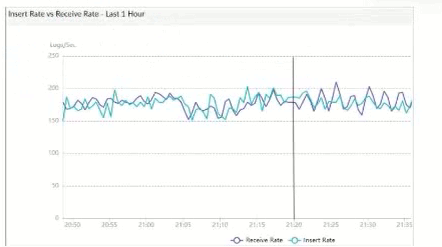
What does the data point at 21:20 indicate?
Correct Answer:
A
The exhibit shows a graph that tracks two metrics over time:Receive RateandInsert Rate. These two rates are crucial for understanding the log processing behavior in FortiAnalyzer.
Understanding Receive Rate and Insert Rate:
Receive Rate: This is the rate at which FortiAnalyzer is receiving logs from connected devices.
Insert Rate: This is the rate at which FortiAnalyzer is indexing (inserting) logs into its database for storage and analysis.
Data Point at 21:20:
At 21:20, theInsert Rateline is above theReceive Rateline, indicating that FortiAnalyzer is inserting logs into its database at a faster rate than it is receiving them. This situation suggests that FortiAnalyzer is able to keep up with the incoming logs and is possibly processing a backlog or temporarily received logs faster than new logs are coming in.
Option Analysis:
Option A - FortiAnalyzer is Indexing Logs Faster Than Logs are Being Received: This accurately describes the scenario at 21:20, where the Insert Rate exceeds the Receive Rate. This indicates that FortiAnalyzer is handling logs efficiently at that moment, with no backlog in processing.
Option B - The fortilogd Daemon is Ahead in Indexing by One Log: The data does not provide specific information about the fortilogd daemon??s log count, only the rates. This option is incorrect.
Option C - SQL Database Requires a Rebuild: High receive lag would imply a backlog in receiving and indexing logs, typically visible if the Receive Rate were significantly above the Insert Rate, which is not the case here.
Option D - FortiAnalyzer is Temporarily Buffering Logs to Index Older Logs First: There is no indication of buffering in this scenario. Buffering would usually occur if the Receive Rate were higher than the Insert Rate, indicating that FortiAnalyzer is storing logs temporarily due to indexing lag.
Conclusion:
Correct Answer:A. FortiAnalyzer is indexing logs faster than logs are being received.
The graph at 21:20 shows a higher Insert Rate than Receive Rate, indicating efficient log processing by FortiAnalyzer.
[References:, FortiAnalyzer 7.4.1 documentation on log processing metrics, Receive Rate, and Insert Rate indicators., ]
Which SQL query is in the correct order to query to database in the FortiAnalyzer?
Correct Answer:
D Which two actions should an administrator take to vide Compromised Hosts on FortiAnalyzer? (Choose two.)
Correct Answer:
AB Which statement about sending notifications with incident update is true?
Correct Answer:
A
In FortiAnalyzer's SQL query syntax, the typical order for querying the database follows the standard SQL format, which is:
SELECT WHERE
Option D correctly follows this structure:
SELECT devid FROM $log: This specifies that the query is selecting the devid column from the $log table.
WHERE 'user' = ': This part of the query is intended to filter results based on a condition involving the user column. Although there appears to be a minor typographical issue (possibly missing the user value after =), it structurally adheres to the correct SQL order.
GROUP BY devid: This groups the results by devid, which is correctly positioned at the end of the query.
Let's briefly examine why the other options are incorrect:
Option A: SELECT devid FROM $log GROUP BY devid WHERE 'user', 'users1'
This is incorrect because the GROUP BY clause appears before the WHERE clause, which is out of order in SQL syntax.
Option B: SELECT FROM $log WHERE devid 'user', USER1' GROUP BY devid
This is incorrect because it lacks a column in the SELECT statement and the WHERE clause syntax is malformed.
Option C: SELCT devid WHERE 'user' - 'USER1' FROM $log GROUP BY devid
This is incorrect because the SELECT keyword is misspelled as SELCT, and the WHERE condition syntax is invalid.
Reference: FortiAnalyzer documentation for SQL queries indicates that the standard SQL order should be followed when querying logs in FortiAnalyzer. Queries should follow the format SELECT ... FROM ... WHERE ... GROUP BY ..., as demonstrated in option D.
To view Compromised Hosts on FortiAnalyzer, certain configurations need to be in place on both FortiGate and FortiAnalyzer. Compromised Host data on FortiAnalyzer relies on log information from FortiGate to analyze threats and compromised activities effectively.
Here's why the selected answers are correct:
Option A: Enable device detection on the FortiGate devices that are sending logs to FortiAnalyzer
Enabling device detection on FortiGate allows it to recognize and log devices within the network, sending critical information about hosts that could be compromised. This is essential because FortiAnalyzer relies on these logs to determine which hosts may be at risk based on suspicious activities observed by FortiGate. This setting enables FortiGate to provide device-level insights, which FortiAnalyzer uses to populate the Compromised Hosts view.
Option B: Enable web filtering in firewall policies on FortiGate devices, and make sure these logs are sent to FortiAnalyzer Web filtering is crucial in identifying potentially compromised hosts since it logs any access to malicious sites or blocked categories. FortiAnalyzer uses these web filter logs to detect suspicious or malicious web activity, which can indicate compromised hosts. By ensuring that FortiGate sends these web filtering logs to FortiAnalyzer, the administrator enables FortiAnalyzer to analyze and identify hosts engaging in risky behavior.
Let's review the other options for clarity:
Option C: Make sure all endpoints are reachable by FortiAnalyzer
This is incorrect. FortiAnalyzer does not need direct access to all endpoints. Instead, it collects data indirectly from FortiGate logs. FortiGate devices are the ones that interact with endpoints and then forward relevant logs to FortiAnalyzer for analysis.
Option D: Subscribe FortiAnalyzer to FortiGuard to keep its local threat database up to date
Although subscribing to FortiGuard helps keep threat intelligence updated, it is not a requirement specifically to view compromised hosts. FortiAnalyzer primarily uses logs from FortiGate (such as web filtering and device detection) to detect compromised hosts.
Reference: According to FortiOS and FortiAnalyzer documentation, device detection on FortiGate and enabling web filtering logs are both recommended steps for populating the Compromised Hosts view on FortiAnalyzer. These logs provide insights into device behaviors and web activity, which are essential for identifying and tracking potentially compromised hosts.
In FortiOS and FortiAnalyzer,incident notificationscan be sent to multiple external platforms, not limited to a single method such as email. Fortinet's security fabric and integration capabilities allow notifications to be
sent through various fabric connectors and third-party integrations. This flexibility is designed to ensure that incident updates reach relevant personnel or systems using preferred communication channels, such as email, Syslog, SNMP, or integration with SIEM platforms.
Let??s review each answer option for clarity:
* Option A: You can send notifications to multiple external platforms
* This is correct. Fortinet??s notification system is capable of sending updates to multiple platforms, thanks to its support for fabric connectors and external integrations. This includes options such as email, Syslog, SNMP, and others based on configured connectors.
* Option B: Notifications can be sent only by email
* This is incorrect. Although email is a common method, FortiOS and FortiAnalyzer support multiple notification methods through various connectors, allowing notifications to be directed to different platforms as per the organization??s setup.
* Option C: If you use multiple fabric connectors, all connectors must have the same settings
* This is incorrect. Each fabric connector can have its unique configuration, allowing different connectors to be tailored for specific notification and integration requirements.
* Option D: Notifications can be sent only when an incident is updated or deleted
* This is incorrect. Notifications can be sent upon the creation of incidents, as well as upon updates or deletion, depending on the configuration.
:According to FortiOS and FortiAnalyzer 7.4.1 documentation, notifications for incidents can be configured across various platforms by using multiple connectors, and they are not limited to email alone. This capability is part of the Fortinet Security Fabric, allowing for a broad range of integrations with external systems and platforms for effective incident response.
