
Refer to the exhibit.
Which statement about the displayed event is correct? (Choose one answer))
Correct Answer:
C
Comprehensive and Detailed Explanation From Exact Extract of knowledge of FortiAnalyzer 7.6 Study guide documents:
The exhibit shows the eventEvent Status = MitigatedandEvent Type = Web Filter, with the event message indicating the web request wasblocked.
The study guide definesMitigatedevents as follows:"Mitigated: The security risk is mitigated by being blocked or dropped."This means a mitigated status corresponds to enforcement that prevented the risk (block/drop), not a condition where the source is isolated.
It also distinguishesContainedevents from mitigated ones:"Contained: The risk source is isolated."Since the exhibit clearly showsMitigated(not Contained), optionBis incorrect.
Additionally, the study guide notes:??Generally, you can acknowledge mitigated events because the related traffic was blocked by the firewall."This aligns directly with the exhibit's "blocked" wording and supports that the correct interpretation is that the security risk was blocked.
Finally, the event type displayed isWeb Filter, not application control, so optionDis incorrect.
Therefore, the correct statement isC. The security risk was blocked.
Which statement about exporting items in Report Definitions is true?
Correct Answer:
C
Which statement about automation connectors in FortiAnalyzer is true?
Correct Answer:
D
Exhibit.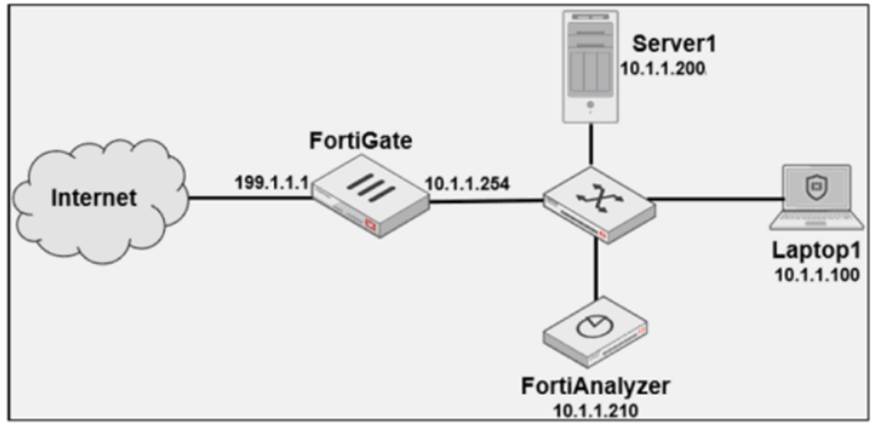
Laptop1 is used by several administrators to manage FotiAnalyzer. You want to configure a generic text filter that matches all login attempts to the web interface generated by any user other than admin????, and coming from Laptop1.
Which filter will achieve the desired result?
Correct Answer:
A
The objective is to create a filter that identifies all login attempts to the FortiAnalyzer web interface (GUI) coming fromLaptop1(IP 10.1.1.100) and excludes the admin user. This filter should match any user other than admin.
Filter Components Analysis:
Operation-login: This portion of the filter will target login actions specifically, which is correct for filtering login attempts.
performed_on==''GUI(10.1.1.100)': This indicates that the login attempt must occur on the GUI interface and originate from the specified IP, which matches Laptop1's IP address (10.1.1.100). This ensures that the filter only matches GUI logins from this specific device.
user!=admin: This part excludes logins by the admin user, meeting the requirement to capture only non-admin users.
Option Analysis:
Option A: Correctly specifies theOperation-login,performed_on==''GUI(10.1.1.100)', anduser!=admin. This setup effectively filters login attempts to the GUI from Laptop1, excluding the admin user.
Option B: Uses the incorrect IP 10.1.1.120 in the performed_on filter, which does not match Laptop1's IP (10.1.1.100).
Option C: This option includessrcip==10.1.1.100anddstip==10.1.1.210but incorrectly specifiesuser==admininstead ofuser!=admin, which does not match the requirement to exclude admin users.
Option D: This option does not specify theperformed_onfield to restrict it to the GUI and only includesdstip(destination IP) withoutsrcip. It also incorrectly uses user!-admin instead of the correct syntaxuser!=admin.
Conclusion:
Correct Answer:A. Operation-login and performed_on==''GUI(10.1.1.100)' and user!=admin
This filter precisely captures the required conditions: login attempts from Laptop1 to the GUI interface by any user except admin.
[References:, FortiAnalyzer 7.4.1 documentation on log filters, syntax for login operations, and GUI login tracking., ]
Which log will generate an event with the status Contained?
Correct Answer:
A
