
You sign in to the Microsoft 365 Copilot app by using your work account as shown in the exhibit.
A colleague tells you that when they open the Microsoft 365 Copilot app, they have access to the Researcher agent. You need to access the Researcher agent.
What should you do?
Correct Answer:
B
You are creating a prompt in Microsoft 365 Copilot to get information about a proposal. You need to ensure that the response is grounded in the proposal's information.
What is the best approach to achieve the goal? More than one answer choice may achieve the goal. Select the BEST answer.
Correct Answer:
C
According to Microsoft AI Business Professional guidance for Microsoft 365 Copilot, grounding a response means ensuring the AI generates output based on specific, authoritative content rather than relying on generalized training data. When working with enterprise documents such as proposals, grounding is achieved by explicitly referencing the source material within the prompt.
Option C is correct because referencing the proposal content directs Copilot to use that specific document as the primary context for generating the response. Microsoft documentation emphasizes that effective prompts should include clear context and explicit references to relevant files, meetings, emails, or documents stored in Microsoft 365. This reduces hallucinations and ensures factual alignment with organizational data.
Option A is incorrect because relying on training data increases the risk of inaccurate or fabricated information. Options B and D improve prompt clarity but do not guarantee grounding in the proposal itself.
Therefore, explicitly referencing the proposal content is the most reliable and best practice method for ensuring grounded, accurate responses in Microsoft 365 Copilot.
HOTSPOT
For each of the following statements, select Yes if the statement is true. Otherwise, select No. NOTE: Each correct selection is worth one point.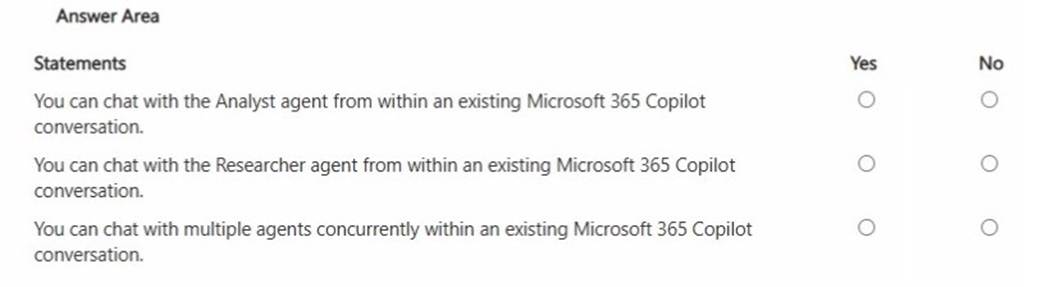
Solution: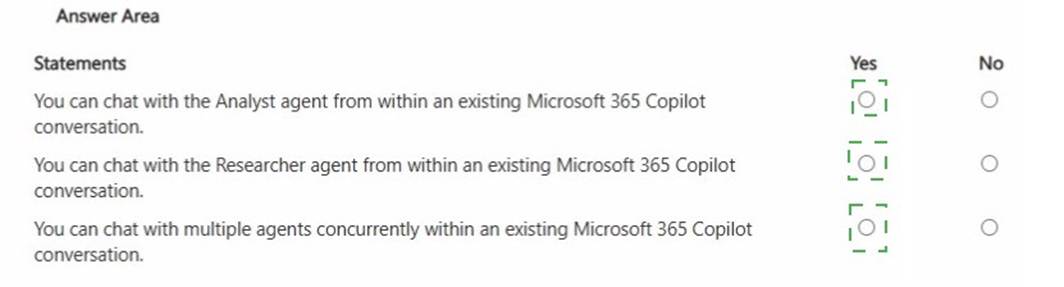
Does this meet the goal?
Correct Answer:
A
You use the Researcher agent in Microsoft 365 Copilot to generate a report.
What can you use to verify whether the report was generated by using valid sources?
Correct Answer:
A
The Researcher agent in Microsoft 365 Copilot is designed to gather and synthesize information from web and organizational sources. To support transparency and trust, Copilot provides citations alongside generated content when external or referenced material is used.
Citations allow users to review the original sources that informed the generated report. This aligns with Microsoft??s Responsible AI commitment to transparency and verifiability. By selecting or reviewing citations, users can confirm that the information originates from credible and relevant references rather than unsupported model-generated text.
Instructions define how the agent behaves but do not validate source authenticity. Memory refers to conversational context retention and does not confirm source validity. Capabilities describe what the agent can do, not whether its output is grounded in legitimate sources.
Therefore, to verify that a report generated by the Researcher agent uses valid sources, you should review the citations.
You are a medical researcher.
You need to ensure that Microsoft 365 Copilot responds to you in a professional manner that is appropriate to your field. What is the best approach to achieve the goal?
Correct Answer:
B
Custom instructions allow users to define persistent preferences for tone, style, and response behavior across conversations. Microsoft documentation explains that Custom instructions help tailor Copilot responses to professional roles, communication styles, and domain expectations.
For a medical researcher requiring consistently professional, field-appropriate responses, configuring Custom instructions in Settings ensures that Copilot maintains the desired tone and terminology in future interactions.
Attaching examples influences only a single conversation. Saving prompts to the Prompt Gallery aids reuse but does not enforce tone globally. Copilot Memory stores factual preferences but is not intended for style configuration.
Therefore, the best and most comprehensive approach is to configure Custom instructions in Settings.
