
You use Microsoft 365 Copilot to create a proposal in Microsoft Word based on a document in a Microsoft SharePoint library.
You need to ensure that the information cited in the proposal is accurate.
What is the best approach to achieve the goal? More than one answer choice may achieve the goal. Select the BEST answer.
Correct Answer:
A
HOTSPOT
For each of the following statements, select Yes if the statement is true. Otherwise, select No. NOTE: Each correct selection is worth one point.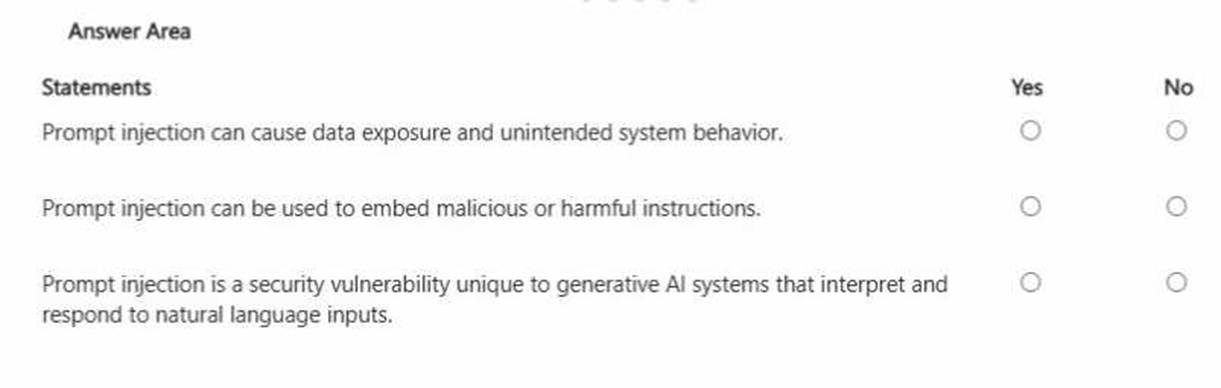
Solution:
Prompt injection is a generative AI security risk where an attacker inserts instructions (often hidden in text, documents, webpages, or user inputs) to override or manipulate the assistant??s intended behavior. This can lead to unintended actions such as ignoring policy controls, producing unsafe outputs, or attempting to reveal sensitive information. Because generative AI systems follow natural-language instructions, they can be socially engineered to prioritize malicious content unless safeguards are in place. This is why prompt injection can cause data exposure (for example, attempting to extract confidential content from grounded sources) and can also embed harmful instructions that redirect the model??s behavior. In enterprise settings like Microsoft 365 Copilot, mitigations include grounding boundaries, permission trimming, content filtering, and instruction hierarchy (system policies over user instructions). From a business governance perspective, users should treat untrusted inputs (emails, documents, web text) as potentially hostile and apply least-privilege access and validation when using AI outputs in decision-making.
Does this meet the goal?
Correct Answer:
A
You are comparing the difference between Microsoft 365 Copilot and Microsoft 365 Copilot Chat.
What is available in both versions?
Correct Answer:
B
You create a Microsoft 365 Copilot notebook and add a file named Process.docx from a local folder. Yesterday, you updated Process.docx in the local folder. What will occur when you chat in the notebook? A. The chat will reference both versions of Process.docx.B. The chat will reference the most recent version of Process.docx.C. The chat will reference only the original version of Process.docx.
Correct Answer:
C
Microsoft 365 Copilot notebooks use the version of a file that was uploaded or attached at the time it was added to the notebook. When a document such as Process.docx is added from a local folder, Copilot references that uploaded snapshot of the file. If the file is later modified locally, the notebook does not automatically sync or refresh with the updated local version unless the updated file is re-uploaded.
Microsoft guidance on grounding and file references explains that Copilot works with the specific content stored in Microsoft 365 or the attached artifact within the notebook session. Since the updated version remains in the local folder and was not reattached, Copilot continues to use the originally added version.
Therefore, during subsequent chats in the notebook, Copilot references only the original uploaded version of Process.docx.
==================================================
You create a prompt in Microsoft 365 Copilot to help you create a draft project report.
You need the prompt to be available in the Copilot Prompt Gallery.
What should you do first?
Correct Answer:
D
To add a custom prompt to the Microsoft 365 Copilot prompt gallery, type your prompt in the chat, click the "Save prompt" (bookmark) icon that appears after the response, and title it for future use. Access the gallery via the "View Prompts" icon in the chat pane to manage or share your saved prompts.
Reference:
https://www.youtube.com/watch?v=BkjK2ZISS1A
