
Which of the following types of social engineering attacks sends an unsolicited text
message to a user's mobile device?
Correct Answer:
D
Comprehensive and Detailed Explanation From Exact Extract:
Smishing (SMS phishing) is a type of social engineering attack where attackers send fraudulent text messages to trick users into revealing sensitive information or downloading malware. These messages often impersonate banks, delivery services, or official institutions to lure the victim into clicking malicious links.
* A. Impersonation is an in-person or voice-based tactic.
* B. Vishing refers to voice phishing over phone calls.
* C. Spear phishing is a targeted email-based phishing method. Reference:
CompTIA A+ 220-1102 Objective 2.3: Compare and contrast social engineering techniques.
Study Guide Section: Smishing as a type of phishing via SMS or mobile messaging.
===========================
Every time a user loads a specific spreadsheet, their computer is temporarily unresponsive. The user also notices that the title bar indicates the application is not responding. Which of the following would a technician most likely inspect?
Correct Answer:
D
Comprehensive and Detailed Explanation From Exact Extract:
If a system becomes unresponsive while opening a specific spreadsheet, the issue is likely tied to the file??s size or the complexity of its content (e.g., embedded formulas, macros, or graphics). High memory utilization caused by the file can lead to temporary freezing or application "Not Responding" messages. Checking the spreadsheet's file size and monitoring system memory in Task Manager will help isolate performance bottlenecks.
* A. Anti-malware logs are important for security troubleshooting but less likely relevant to spreadsheet-related performance issues.
* B. Workstation repair is for system-wide problems and not necessary for a single-file issue.
* C. Bandwidth relates to network usage and wouldn??t impact opening a local file. Reference:
CompTIA A+ 220-1102 Objective 3.3: Troubleshoot common application issues.
Study Guide Section: Troubleshooting application slowness and performance using Task Manager and resource monitoring tools
===========================
SIMULATION
You are configuring a home network for a customer. The customer has requested the ability to access a Windows PC remotely, and needs all chat and optional functions to work in their game console.
INSTRUCTIONS
Use the drop-down menus to complete the network configuration for the customer. Each option may only be used once, and not all options will be used.
Then, click the + sign to place each device in its appropriate location.
If at any time you would like to bring back the initial state of the simulation, please click the Reset All button.
Wireless AP LAN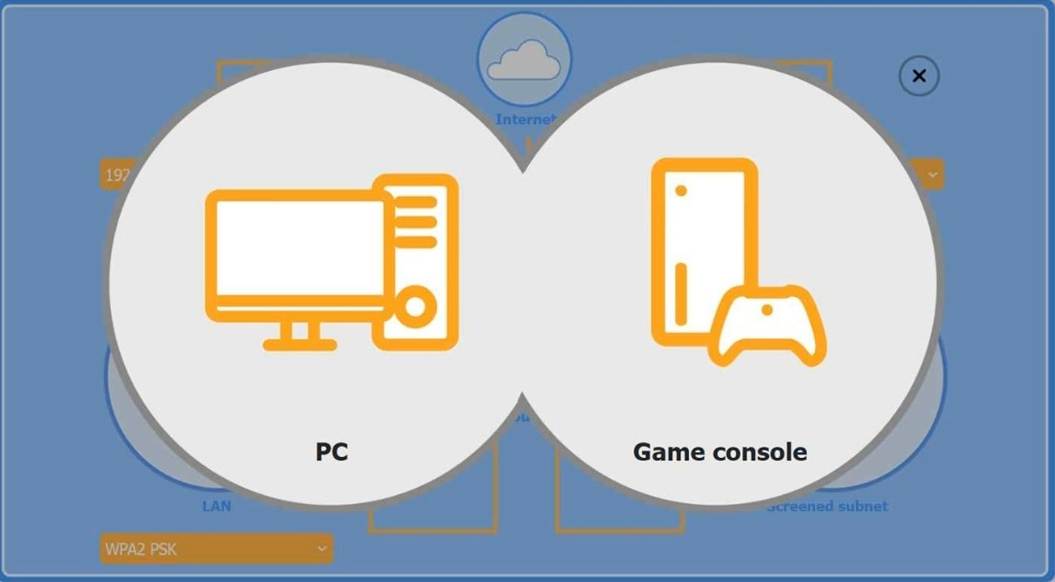
Firewall Screened Subnet

Solution:
The completed configuration:
* 1. Wireless AP (LAN side) 1. LAN IP: 192.168.10.1
* 2. Encryption: WPA2 PSK
* 2. Router (port-forward rule)
* 1. Allow TCP Any 3389
This forwards inbound RDP traffic (TCP/3389) from the Internet to the Windows PC, enabling Remote Desktop access.
* 3. Firewall (screened subnet side) 1. LAN IP: 10.100.0.1
* 4. Device placement
* 1. PC: place behind the router (where the port-forward rule points).
* 2. Game console: place on the Wireless AP (so it can use chat and extra services over WPA2 PSK).
* 3. Firewall: place in front of the screened subnet (with its 10.100.0.1 IP facing that subnet).
✑ The Windows PC is placed in the screened subnet (behind the firewall) for enhanced security. Remote access to this PC requires port forwarding of TCP port 3389 (RDP), which is correctly configured through the router.
✑ The Game Console is placed on the Wireless AP LAN, using WPA2 PSK for a secure wireless connection. Game consoles typically use peer-to-peer chat and online services that require open access without firewall restrictions, which is why the console is not placed behind the firewall.
CompTIA A+ 220-1102 Reference Points:
✑ Objective 3.4: Given a scenario, implement best practices associated with data and device security.
✑ Objective 2.4: Given a scenario, use appropriate tools to support and configure network settings.
✑ Study Guide Reference: CompTIA A+ Core 2 guides recommend using screened subnets (a type of DMZ) for systems needing controlled external access, such as remote desktops, while placing gaming and media devices on less restricted networks for full functionality.
Does this meet the goal?
Correct Answer:
A
A user is experiencing issues with outdated images while browsing websites. Which of the following settings should a technician use to correct this issue?
Correct Answer:
C
Comprehensive and Detailed Explanation From Exact Extract: Outdated images and website data often result from cached files in the browser. The Internet Options panel in Windows (specifically under the General tab) allows users to clear browsing history, including cached images and files, which forces the browser to load the most current versions of web content.
* A. Administrative Tools is used for advanced system management, not browser settings.
* B. Windows Defender Firewall controls network traffic and security rules, not caching.
* D. Ease of Access provides accessibility features for users with disabilities — unrelated to web browsing issues.
Reference:
CompTIA A+ 220-1102 Objective 3.3: Troubleshoot common software and application issues.
Study Guide Section: Internet Options and browser cache clearing for display issues
A user has been adding data to the same spreadsheet for several years. After adding a significant amount of data, they are now unable to open the file. Which of the following should a technician do to resolve the issue?
Correct Answer:
B
Comprehensive and Detailed Explanation From Exact Extract:
When a spreadsheet becomes very large, opening and processing it requires more memory (RAM). If the system doesn't have sufficient memory, it may fail to load the file properly. Upgrading or increasing the available RAM can resolve performance and loading issues with very large files.
* A. Restore points roll back system settings, not individual file content.
* C. Defragmentation optimizes disk performance but won??t help with memory issues.
* D. Network speed has no effect if the file is stored and opened locally. Reference:
CompTIA A+ 220-1102 Objective 3.3: Troubleshoot common application and performance issues.
Study Guide Section: Troubleshooting large-file performance and system resource limitations
===========================
