
An organization must block user attempts to log in to non-company resources while using Microsoft Office 365 to prevent users from accessing unapproved cloud resources.
Which FortiSASE feature can you implement to achieve this requirement?
Correct Answer:
A
To block user attempts to log in to non-company resources while using Microsoft Office 365, theWeb Filter with Inline-CASBfeature in FortiSASE is the most appropriate solution. Inline-CASB (Cloud Access Security Broker) provides real-time visibility and control over cloud application usage. When combined with Web Filtering, it can enforce policies to restrict access to unauthorized or non-company resources within sanctioned applications like Microsoft Office 365. This ensures that users cannot access unapproved cloud resources while still allowing legitimate use of Office 365.
Here??s why the other options are incorrect:
✑ B. SSL deep inspection:While SSL deep inspection is useful for decrypting and inspecting encrypted traffic, it does not specifically address the need to block access to non-companyresources within Office 365. It focuses on securing traffic rather than enforcing application-specific policies.
✑ C. Data loss prevention (DLP):DLP is designed to prevent sensitive data from being leaked or exfiltrated. While it is a valuable security feature, it does not directly block access to non-company resources within Office 365.
✑ D. Application Control with Inline-CASB:Application Control focuses on managing access to specific applications rather than enforcing granular policies within an application like Office 365. Web Filter with Inline-CASB is better suited for this use case.
References:
✑ Fortinet FCSS FortiSASE Documentation - Inline-CASB and Web Filtering
✑ FortiSASE Administration Guide - Securing Cloud Applications
================
What are two advantages of using zero-trust tags? (Choose two.)
Correct Answer:
AB
Zero-trust tags are critical in implementing zero-trust network access (ZTNA) policies. Here are the two key advantages of using zero-trust tags:
✑ Access Control (Allow or Deny):
✑ Determining Security Posture:
References:
✑ FortiOS 7.2 Administration Guide: Provides detailed information on configuring and using zero-trust tags for access control and security posture assessment.
✑ FortiSASE 23.2 Documentation: Explains how zero-trust tags are implemented and used within the FortiSASE environment for enhancing security and compliance.
Refer to the exhibit.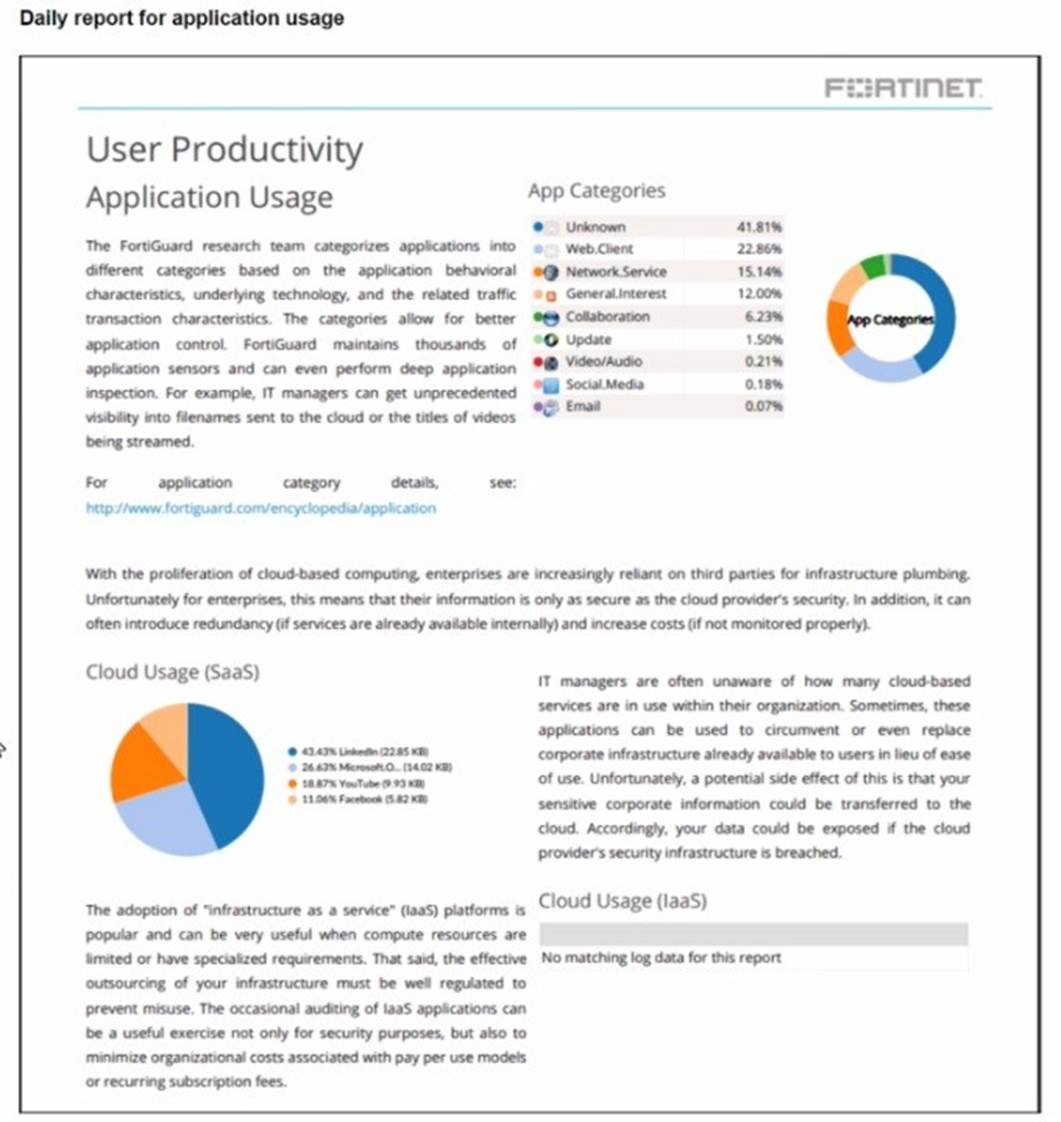
The daily report for application usage shows an unusually high number of unknown applications by category.
What are two possible explanations for this? (Choose two.)
Correct Answer:
BD
Refer to the exhibit.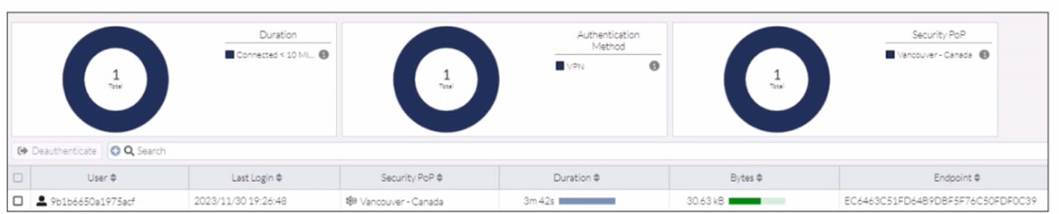
In the user connection monitor, the FortiSASE administrator notices the user name is showing random characters. Which configuration change must the administrator make to get proper user information?
Correct Answer:
A
In the user connection monitor, the random characters shown for the username indicate that log anonymization is enabled. Log anonymization is a feature that hides the actual user informationin the logs for privacy and security reasons. To display proper user information, you need to disable log anonymization.
✑ Log Anonymization:
✑ Disabling Log Anonymization:
References:
✑ FortiSASE 23.2 Documentation: Provides detailed steps on enabling and disabling log anonymization.
✑ Fortinet Knowledge Base: Explains the impact of log anonymization on user monitoring and logging.
When you configure FortiSASE Secure Private Access (SPA) with SD-WAN integration, you must establish a routing adjacency between FortiSASE and the FortiGate SD-WAN hub. Which routing protocol must you use?
Correct Answer:
A
When configuring FortiSASE Secure Private Access (SPA) with SD-WAN integration, establishing a routing adjacency between FortiSASE and the FortiGate SD- WAN hub requires the use of the Border Gateway Protocol (BGP).
✑ BGP (Border Gateway Protocol):
✑ Routing Adjacency:
References:
✑ FortiOS 7.2 Administration Guide: Provides information on configuring BGP for SD-WAN integration.
✑ FortiSASE 23.2 Documentation: Details on setting up routing adjacencies using BGP for Secure Private Access with SD-WAN.
