
- Vendor
- Microsoft
- VMware
- MuleSoft
- Splunk
- Oracle
- CompTIA
- Fortinet
- Cisco
- EC-Council
- ISC2
- Paloalto-Networks
- HP
- IBM
- Salesforce
- PMI
- Amazon
- LPI
- Check-Point
- iSQI
- Juniper
- AZ-900 Practice Test
- MB-901 Practice Test
- AZ-300 Practice Test
- MS-900 Practice Test
- MS-700 Practice Test
- MD-100 Practice Test
- AZ-400 Practice Test
- mb-200 Practice Test
- 70-764 Practice Test
- MD-101 Practice Test
- AZ-301 Practice Test
- az-500 Practice Test
- AZ-204 Practice Test
- 70-741 Practice Test
- MS-101 Practice Test
- 70-740 Practice Test
- AZ-104 Practice Test
- AZ-103 Practice Test
- 70-742 Practice Test
- MS-100 Practice Test
- 2V0-21.19 Practice Test
- 2V0-21.19D Practice Test
- 2V0-01.19 Practice Test
- 3v0-624 Practice Test
- 1V0-701 Practice Test
- 2V0-761 Practice Test
- 2V0-622 Practice Test
- 2V0-61.19 Practice Test
- 2V0-621 Practice Test
- 2V0-642 Practice Test
- 3V0-21.18 Practice Test
- 2V0-41.20 Practice Test
- 2V0-21.20 Practice Test
- 2V0-751 Practice Test
- 2V0-621D Practice Test
- 3V0-42.20 Practice Test
- 2V0-31.20 Practice Test
- 2V0-21.20 Practice Test
- 2V0-41.20 Practice Test
- 2V0-21.20 Practice Test
- MCD-Level-1 Practice Test
- MCIA-Level-1 Practice Test
- MCPA-Level-1 Practice Test
- MCPA-Level-1-Maintenance Practice Test
- SPLK-1001 Practice Test
- SPLK-2002 Practice Test
- SPLK-1002 Practice Test
- SPLK-1003 Practice Test
- SPLK-3001 Practice Test
- SPLK-1005 Practice Test
- SPLK-2003 Practice Test
- SPLK-2001 Practice Test
- SPLK-5001 Practice Test
- 1z0-1054 Practice Test
- 1z0-1053 Practice Test
- 1z0-888 Practice Test
- 1z0-468 Practice Test
- 1z0-067 Practice Test
- 1z0-900 Practice Test
- 1Z0-809 Practice Test
- 1Z0-435 Practice Test
- 1z0-1042 Practice Test
- 1z0-808 Practice Test
- 1z0-1050 Practice Test
- 1z0-813 Practice Test
- 1z0-1064 Practice Test
- 1z0-060 Practice Test
- 1Z0-071 Practice Test
- 1z0-1048 Practice Test
- 1z0-1047 Practice Test
- 1Z0-062 Practice Test
- 1z0-083 Practice Test
- 1z0-1049 Practice Test
- N10-007 Practice Test
- XK0-004 Practice Test
- SY0-501 Practice Test
- 220-1001 Practice Test
- CS0-001 Practice Test
- 220-1002 Practice Test
- CAS-003 Practice Test
- PK0-004 Practice Test
- PT0-001 Practice Test
- jn0-361 Practice Test
- jn0-210 Practice Test
- N10-006 Practice Test
- SY0-601 Practice Test
- CS0-002 Practice Test
- CV0-002 Practice Test
- CAS-003 Practice Test
- PT0-001 Practice Test
- CS0-002 Practice Test
- N10-007 Practice Test
- 220-1002 Practice Test
- NSE4_FGT-6.0 Practice Test
- NSE7_EFW-6.0 Practice Test
- NSE4_FGT-6.2 Practice Test
- NSE4 Practice Test
- NSE7_EFW-6.2 Practice Test
- NSE8_810 Practice Test
- NSE5_FAZ-6.2 Practice Test
- NSE7_ATP-2.5 Practice Test
- NSE7 Practice Test
- NSE4_FGT-6.4 Practice Test
- NSE6_FWB-6.0 Practice Test
- NSE4_FGT-6.4 Practice Test
- NSE7_SAC-6.2 Practice Test
- NSE7_OTS-6.4 Practice Test
- NSE7_EFW-6.4 Practice Test
- NSE6_FNC-8.5 Practice Test
- NSE5_FSM-5.2 Practice Test
- NSE4_FGT-7.0 Practice Test
- NSE5_FAZ-6.4 Practice Test
- NSE7_SDW-6.4 Practice Test
- 200-301 Practice Test
- 350-401 Practice Test
- 300-410 Practice Test
- 700-905 Practice Test
- 300-475 Practice Test
- 352-001 Practice Test
- 300-735 Practice Test
- 010-151 Practice Test
- 700-765 Practice Test
- 300-715 Practice Test
- 300-415 Practice Test
- 200-901 Practice Test
- 350-901 Practice Test
- 300-430 Practice Test
- 810-440 Practice Test
- 350-701 Practice Test
- 300-820 Practice Test
- 300-730 Practice Test
- 300-435 Practice Test
- 600-601 Practice Test
- 312-50v10 Practice Test
- 412-79v10 Practice Test
- 312-38 Practice Test
- 312-50v11 Practice Test
- 212-89 Practice Test
- 312-50 Practice Test
- 312-85 Practice Test
- 312-49v10 Practice Test
- 312-50v12 Practice Test
- 712-50 Practice Test
- 312-39 Practice Test
- 212-82 Practice Test
- ECSAv10 Practice Test
- 312-49v9 Practice Test
- 312-50v13 Practice Test
- CCSP Practice Test
- CISSP Practice Test
- CISSP-ISSAP Practice Test
- CISSP-ISSEP Practice Test
- SSCP Practice Test
- CCSP Practice Test
- HCISPP Practice Test
- CAP Practice Test
- ISSMP Practice Test
- ISSEP Practice Test
- CSSLP Practice Test
- ISSAP Practice Test
- CC Practice Test
- PCNSE Practice Test
- PCNSA Practice Test
- PCNSE7 Practice Test
- PSE-Cortex Practice Test
- PCCET Practice Test
- PCCSE Practice Test
- NetSec-Pro Practice Test
- PSE-Strata-Pro-24 Practice Test
- HPE0-V14 Practice Test
- HP2-H82 Practice Test
- HPE2-K42 Practice Test
- HPE0-S56 Practice Test
- HPE0-J57 Practice Test
- HPE6-A70 Practice Test
- HPE2-E71 Practice Test
- hpe6-a41 Practice Test
- HPE6-A45 Practice Test
- HPE6-A82 Practice Test
- HPE2-T36 Practice Test
- HPE0-S57 Practice Test
- HPE0-P26 Practice Test
- HPE6-A47 Practice Test
- HPE0-S58 Practice Test
- HPE2-T37 Practice Test
- HPE0-S54 Practice Test
- HPE6-A73 Practice Test
- HPE6-A72 Practice Test
- HPE6-A78 Practice Test
- 1Y0-204 Practice Test
- C2150-606 Practice Test
- C1000-010 Practice Test
- C2150-609 Practice Test
- C1000-017 Practice Test
- C9510-418 Practice Test
- P9530-039 Practice Test
- C2090-558 Practice Test
- 1Y0-204 Practice Test
- C9510-401 Practice Test
- C1000-007 Practice Test
- C2090-616 Practice Test
- C2090-102 Practice Test
- C9560-503 Practice Test
- M2150-860 Practice Test
- C2010-555 Practice Test
- C2010-825 Practice Test
- C1000-118 Practice Test
- C2090-619 Practice Test
- C1000-056 Practice Test
- PDI Practice Test
- CRT-450 Practice Test
- ADM-201 Practice Test
- CRT-251 Practice Test
- Sharing-and-Visibility-Designer Practice Test
- Platform-App-Builder Practice Test
- Development-Lifecycle-and-Deployment-Designer Practice Test
- Integration-Architecture-Designer Practice Test
- ADM-201 Practice Test
- B2C-Commerce-Developer Practice Test
- Data-Architecture-And-Management-Designer Practice Test
- OmniStudio-Consultant Practice Test
- Identity-and-Access-Management-Designer Practice Test
- Experience-Cloud-Consultant Practice Test
- Marketing-Cloud-Email-Specialist Practice Test
- JavaScript-Developer-I Practice Test
- OmniStudio-Developer Practice Test
- Field-Service-Lightning-Consultant Practice Test
- Certified-Business-Analyst Practice Test
- DEV-501 Practice Test
- PMI-001 Practice Test
- PMI-ACP Practice Test
- CAPM Practice Test
- PMI-RMP Practice Test
- PMI-PBA Practice Test
- PMI-100 Practice Test
- PMI-SP Practice Test
- PgMP Practice Test
- PfMP Practice Test
- CPMAI_v7 Practice Test
- AWS-Certified-Cloud-Practitioner Practice Test
- AWS-Certified-Developer-Associate Practice Test
- AWS-Certified-Solutions-Architect-Professional Practice Test
- AWS-SysOps Practice Test
- AWS-Certified-DevOps-Engineer-Professional Practice Test
- AWS-Solution-Architect-Associate Practice Test
- AWS-Certified-Big-Data-Specialty Practice Test
- AWS-Certified-Security-Specialty Practice Test
- AWS-Certified-Advanced-Networking-Specialty Practice Test
- AWS-Certified-Security-Specialty Practice Test
- AWS-Certified-Developer-Associate Practice Test
- AWS-Certified-Solutions-Architect-Professional Practice Test
- AWS-Certified-DevOps-Engineer-Professional Practice Test
- AWS-Certified-Database-Specialty Practice Test
- DVA-C02 Practice Test
- AWS-Certified-Data-Analytics-Specialty Practice Test
- AWS-Certified-Data-Engineer-Associate Practice Test
- AWS-Certified-Machine-Learning-Specialty Practice Test
- 101-500 Practice Test
- 102-500 Practice Test
- 201-450 Practice Test
- 202-450 Practice Test
- 010-150 Practice Test
- 010-160 Practice Test
- 303-200 Practice Test
- 156-315.80 Practice Test
- 156-215.80 Practice Test
- 156-215.80 Practice Test
- 156-315.80 Practice Test
- 156-215.77 Practice Test
- 156-915.80 Practice Test
- JN0-102 Practice Test
- JN0-211 Practice Test
- JN0-662 Practice Test
- JN0-103 Practice Test
- JN0-648 Practice Test
- JN0-348 Practice Test
- JN0-230 Practice Test
- JN0-1301 Practice Test
- JN0-1332 Practice Test
- JN0-104 Practice Test
- JN0-682 Practice Test
- JN0-334 Practice Test
- JN0-363 Practice Test
- JN0-231 Practice Test
- JN0-664 Practice Test
- JN0-351 Practice Test
- JN0-683 Practice Test
- JN0-452 Practice Test
- JN0-460 Practice Test
- JN0-637 Practice Test
- Categories
- Microsoft
- VMware
- MuleSoft
- Splunk
- Oracle
- CompTIA
- Fortinet
- Cisco
- EC-Council
- ISC2
- Paloalto-Networks
- HP
- IBM
- Salesforce
- PMI
- Amazon
- LPI
- Check-Point
- iSQI
- Juniper
- AZ-900 Dumps
- MB-901 Dumps
- AZ-300 Dumps
- MS-900 Dumps
- MS-700 Dumps
- MD-100 Dumps
- AZ-400 Dumps
- mb-200 Dumps
- 70-764 Dumps
- MD-101 Dumps
- AZ-301 Dumps
- az-500 Dumps
- AZ-204 Dumps
- 70-741 Dumps
- MS-101 Dumps
- 70-740 Dumps
- AZ-104 Dumps
- AZ-103 Dumps
- 70-742 Dumps
- MS-100 Dumps
- 2V0-21.19 Dumps
- 2V0-21.19D Dumps
- 2V0-01.19 Dumps
- 3v0-624 Dumps
- 1V0-701 Dumps
- 2V0-761 Dumps
- 2V0-622 Dumps
- 2V0-61.19 Dumps
- 2V0-621 Dumps
- 2V0-642 Dumps
- 3V0-21.18 Dumps
- 2V0-41.20 Dumps
- 2V0-21.20 Dumps
- 2V0-751 Dumps
- 2V0-621D Dumps
- 3V0-42.20 Dumps
- 2V0-31.20 Dumps
- 2V0-21.20 Dumps
- 2V0-41.20 Dumps
- 2V0-21.20 Dumps
- SPLK-1001 Dumps
- SPLK-2002 Dumps
- SPLK-1002 Dumps
- SPLK-1003 Dumps
- SPLK-3001 Dumps
- SPLK-1005 Dumps
- SPLK-2003 Dumps
- SPLK-2001 Dumps
- SPLK-5001 Dumps
- 1z0-1054 Dumps
- 1z0-1053 Dumps
- 1z0-888 Dumps
- 1z0-468 Dumps
- 1z0-067 Dumps
- 1z0-900 Dumps
- 1Z0-809 Dumps
- 1Z0-435 Dumps
- 1z0-1042 Dumps
- 1z0-808 Dumps
- 1z0-1050 Dumps
- 1z0-813 Dumps
- 1z0-1064 Dumps
- 1z0-060 Dumps
- 1Z0-071 Dumps
- 1z0-1048 Dumps
- 1z0-1047 Dumps
- 1Z0-062 Dumps
- 1z0-083 Dumps
- 1z0-1049 Dumps
- N10-007 Dumps
- XK0-004 Dumps
- SY0-501 Dumps
- 220-1001 Dumps
- CS0-001 Dumps
- 220-1002 Dumps
- CAS-003 Dumps
- PK0-004 Dumps
- PT0-001 Dumps
- jn0-361 Dumps
- jn0-210 Dumps
- N10-006 Dumps
- SY0-601 Dumps
- CS0-002 Dumps
- CV0-002 Dumps
- CAS-003 Dumps
- PT0-001 Dumps
- CS0-002 Dumps
- N10-007 Dumps
- 220-1002 Dumps
- NSE4_FGT-6.0 Dumps
- NSE7_EFW-6.0 Dumps
- NSE4_FGT-6.2 Dumps
- NSE4 Dumps
- NSE7_EFW-6.2 Dumps
- NSE8_810 Dumps
- NSE5_FAZ-6.2 Dumps
- NSE7_ATP-2.5 Dumps
- NSE7 Dumps
- NSE4_FGT-6.4 Dumps
- NSE6_FWB-6.0 Dumps
- NSE4_FGT-6.4 Dumps
- NSE7_SAC-6.2 Dumps
- NSE7_OTS-6.4 Dumps
- NSE7_EFW-6.4 Dumps
- NSE6_FNC-8.5 Dumps
- NSE5_FSM-5.2 Dumps
- NSE4_FGT-7.0 Dumps
- NSE5_FAZ-6.4 Dumps
- NSE7_SDW-6.4 Dumps
- 200-301 Dumps
- 350-401 Dumps
- 300-410 Dumps
- 700-905 Dumps
- 300-475 Dumps
- 352-001 Dumps
- 300-735 Dumps
- 010-151 Dumps
- 700-765 Dumps
- 300-715 Dumps
- 300-415 Dumps
- 200-901 Dumps
- 350-901 Dumps
- 300-430 Dumps
- 810-440 Dumps
- 350-701 Dumps
- 300-820 Dumps
- 300-730 Dumps
- 300-435 Dumps
- 600-601 Dumps
- 312-50v10 Dumps
- 412-79v10 Dumps
- 312-38 Dumps
- 312-50v11 Dumps
- 212-89 Dumps
- 312-50 Dumps
- 312-85 Dumps
- 312-49v10 Dumps
- 312-50v12 Dumps
- 712-50 Dumps
- 312-39 Dumps
- 212-82 Dumps
- ECSAv10 Dumps
- 312-49v9 Dumps
- 312-50v13 Dumps
- CCSP Dumps
- CISSP Dumps
- CISSP-ISSAP Dumps
- CISSP-ISSEP Dumps
- SSCP Dumps
- CCSP Dumps
- HCISPP Dumps
- CAP Dumps
- ISSMP Dumps
- ISSEP Dumps
- CSSLP Dumps
- ISSAP Dumps
- CC Dumps
- PCNSE Dumps
- PCNSA Dumps
- PCNSE7 Dumps
- PSE-Cortex Dumps
- PCCET Dumps
- PCCSE Dumps
- NetSec-Pro Dumps
- PSE-Strata-Pro-24 Dumps
- HPE0-V14 Dumps
- HP2-H82 Dumps
- HPE2-K42 Dumps
- HPE0-S56 Dumps
- HPE0-J57 Dumps
- HPE6-A70 Dumps
- HPE2-E71 Dumps
- hpe6-a41 Dumps
- HPE6-A45 Dumps
- HPE6-A82 Dumps
- HPE2-T36 Dumps
- HPE0-S57 Dumps
- HPE0-P26 Dumps
- HPE6-A47 Dumps
- HPE0-S58 Dumps
- HPE2-T37 Dumps
- HPE0-S54 Dumps
- HPE6-A73 Dumps
- HPE6-A72 Dumps
- HPE6-A78 Dumps
- 1Y0-204 Dumps
- C2150-606 Dumps
- C1000-010 Dumps
- C2150-609 Dumps
- C1000-017 Dumps
- C9510-418 Dumps
- P9530-039 Dumps
- C2090-558 Dumps
- 1Y0-204 Dumps
- C9510-401 Dumps
- C1000-007 Dumps
- C2090-616 Dumps
- C2090-102 Dumps
- C9560-503 Dumps
- M2150-860 Dumps
- C2010-555 Dumps
- C2010-825 Dumps
- C1000-118 Dumps
- C2090-619 Dumps
- C1000-056 Dumps
- PDI Dumps
- CRT-450 Dumps
- ADM-201 Dumps
- CRT-251 Dumps
- Sharing-and-Visibility-Designer Dumps
- Platform-App-Builder Dumps
- Development-Lifecycle-and-Deployment-Designer Dumps
- Integration-Architecture-Designer Dumps
- ADM-201 Dumps
- B2C-Commerce-Developer Dumps
- Data-Architecture-And-Management-Designer Dumps
- OmniStudio-Consultant Dumps
- Identity-and-Access-Management-Designer Dumps
- Experience-Cloud-Consultant Dumps
- Marketing-Cloud-Email-Specialist Dumps
- JavaScript-Developer-I Dumps
- OmniStudio-Developer Dumps
- Field-Service-Lightning-Consultant Dumps
- Certified-Business-Analyst Dumps
- DEV-501 Dumps
- PMI-001 Dumps
- PMI-ACP Dumps
- CAPM Dumps
- PMI-RMP Dumps
- PMI-PBA Dumps
- PMI-100 Dumps
- PMI-SP Dumps
- PgMP Dumps
- PfMP Dumps
- CPMAI_v7 Dumps
- AWS-Certified-Cloud-Practitioner Dumps
- AWS-Certified-Developer-Associate Dumps
- AWS-Certified-Solutions-Architect-Professional Dumps
- AWS-SysOps Dumps
- AWS-Certified-DevOps-Engineer-Professional Dumps
- AWS-Solution-Architect-Associate Dumps
- AWS-Certified-Big-Data-Specialty Dumps
- AWS-Certified-Security-Specialty Dumps
- AWS-Certified-Advanced-Networking-Specialty Dumps
- AWS-Certified-Security-Specialty Dumps
- AWS-Certified-Developer-Associate Dumps
- AWS-Certified-Solutions-Architect-Professional Dumps
- AWS-Certified-DevOps-Engineer-Professional Dumps
- AWS-Certified-Database-Specialty Dumps
- DVA-C02 Dumps
- AWS-Certified-Data-Analytics-Specialty Dumps
- AWS-Certified-Data-Engineer-Associate Dumps
- AWS-Certified-Machine-Learning-Specialty Dumps
F5CAB1 Dumps
F5CAB1 Free Practice Test
F5-Networks F5CAB1: BIG-IP Administration Install, Initial Configuration, and Upgrade
A BIG-IP Administrator upgrades the BIG-IP LTM to a newer software version. After the administrator reboots into the new volume, the configuration fails to load.
Why is the configuration failing to load?
Correct Answer:
B
When upgrading to a newer TMOS software version, BIG-IP validates whether the current license is permitted to run that version.
This is controlled by theService Check Datein the device??s license file.
If the Service Check Date is older than the minimum required for the target version: The systemboots into the new volume,
  Butfails to load the configuration, And will instead present messages indicating that the configuration cannot be applied due to aninvalid or outdated license.
This is a well-known behavior:
An outdated license, not reactivated before upgrade, causes configuration load failure after reboot into the new software.
Why the other options are incorrect:
* A. Performed on the standby unit Upgrading a standby unit does not cause configuration load failure. Standby-only upgrades are standard best practice.
* C. Two reboots required BIG-IP does not require two reboots during an upgrade. One reboot into the new volume is sufficient.
* D. DNS connectivity failure DNS connectivity does not affect configuration loading. DNS is only needed for automatic license activation, not for applying config at boot.
Thus, the configuration failed to load because thelicense was not reactivated before the upgrade, making
Option B correct.
How should a BIG-IP Administrator check the provisioned CPU percent for a module?
(Choose two.)
Correct Answer:
CD
BIG-IP allocates CPU and memory resources based on module provisioning levels.
To view how much CPU a module is assigned, administrators must check provisioning information
from:
* C . GUI --- System Resource Provisioning
This page visually displays CPU allocation via color-coded bars.
Hovering over the CPU bar shows:
CPU usage percent per module
Which modules share CPU cycles
The system's total resource allocation
This is the primary GUI method.
* D . tmsh show /sys provision
This command displays detailed module provisioning information including:
Provisioned modules
Their provisioning level
CPU and memory allocation data
It is the authoritative CLI method for resource provisioning status.
Why the other options are incorrect:
* A . top
Shows real-time process usage, not provisioned CPU allocation.
* B . tmsh show /sys cpu
Displays CPU runtime utilization, not per-module provisioning.
* E . Statistics Dashboard
Only shows traffic / system runtime metrics, not provisioning resource allocations.
Therefore, C and D are correct.
For security reasons, a BIG-IP Administrator needs to specify allowable IP ranges for access to the Configuration Utility (WebUI).
The exhibit shows the User Administration section of the Configuration Utility.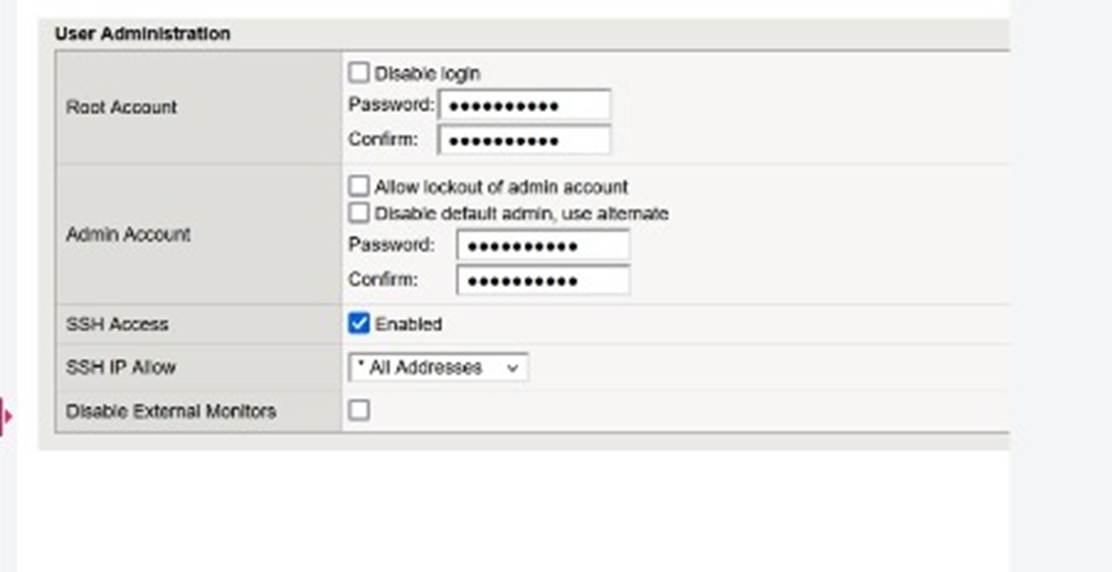
The administrator could not find any setting that explicitly restricts access to the Configuration Utility. Which one of the following is a reason for that?
Correct Answer:
A
The screenshot shown is from theUser Administrationsection of the BIG-IP GUI. This section controls: Root and Admin passwords SSH Access
 SSH IP Allow settings
However,it does not contain any controls for restricting access to the WebUI (TMUI).
BIG-IP does not provide TMUI access restrictions from this part of the GUI.
Access to the web-based Configuration Utility is controlled by thehttpd allow list, configured through TMSH:
tmsh modify /sys httpd allow {
This setting is not displayed in the User Administration panel, and in many BIG-IP versions, the httpd allow list isonly configurable from the CLI, not the GUI.
Therefore, the administrator cannot find the setting in the screen shown because: TMUI access restriction isnotlocated in this GUI section It must be configured usingtmshunder/sys httpd allow
This is why Option A is correct.
