
For an upgrade of a standalone BIG-IP, a maintenance window is available in which brief interruptions are allowed.
Actions with no impact can be done outside the maintenance window.
When should a license reactivation be performed?
Correct Answer:
B
License reactivation updates the BIG-IP device??s license file to ensure:  TheService Check Dateis current
 The device is eligible to install the intended TMOS version Any module entitlement updates are received
Reactivationdoes not interrupt trafficand does not require a reboot, making it safe to performbeforethe maintenance window.
F5 best practices state: Performall non-impact tasks priorto the scheduled maintenance window Leave the window available for activities that require rebooting, such as the software installation itself Since license reactivation isnon-disruptive, it should be donebeforethe upgrade window starts.
What are the two options for securing a BIG-IP??s management interface? (Choose two.)
Correct Answer:
AD
Securing the BIG-IP management interface is a fundamental administrative responsibility. F5 best practices emphasize restricting who can reach the management port and ensuring that only authorized systems are allowed access.
* A. Limiting management access to trusted network segments
F5 recommends placing the management interface on adedicated, isolated, and secured management network or VLAN, rather than exposing it to production or untrusted networks.
This reduces the attack surface by ensuring only trusted segments have visibility to administrative interfaces.
* D. Restricting management access by IP or subnet
F5 BIG-IP uses the/sys httpd allowlist (for HTTPS) and configuration options insshd(for SSH) to control which IP addresses or subnets can access the device.
By specifying only known administrative IPs or ranges, unauthorized users cannot reach the login services.
Why the other options are incorrect
* B. Blocking all management HTTPS/SSH ports This would prevent any administrative access and is not a viable security practice.
* C. Using Self-IP addresses for administrative access F5 explicitly warns against using Self-IPs for management access unless strictly necessary. Self-IPs are exposed to the data plane and should not be used as the primary administrative interface.
An administrator is in the process of reactivating the license using the interface displayed in the exhibit.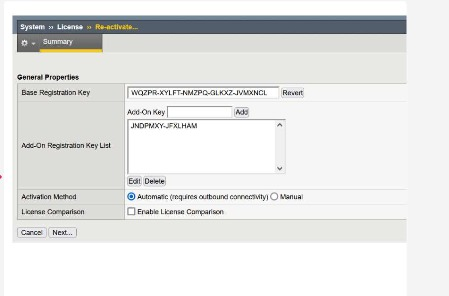
What is the address of the license server to which the BIG-IP device must be able to establish an outbound connection in order to use the Automatic Activation Method?
Correct Answer:
D
When you chooseAutomaticas the activation method in the License › Re-activate screen, the BIG-IP device itself contacts F5??slicense activation serviceover the Internet.
For successful automatic activation: The BIG-IP must have outbound network connectivity (typically via the management interface).
 DNS resolution and routing must allow it to reach theF5 license activation host(the one shown in option D). The device sends its dossier and registration key to that service and receives an updated license file in return, which is then installed automatically.
The other host names in the options are not used by BIG-IP for license activation, so they cannot be correct in the context of Automatic Activation.
Refer to the exhibit.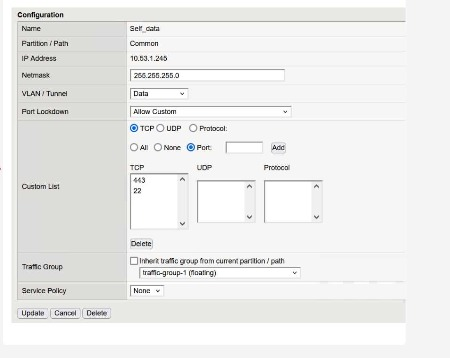
What traffic will be permitted to reach the BIG-IP?
Correct Answer:
B
The exhibit shows the configuration of aSelf IPwith:
Port Lockdown: Allow Custom
ACustom Listthat includes the following TCP ports:
443
22
Meaning of these ports:
TCP 443?? HTTPS (TMUI — web-based management)
TCP 22?? SSH (command-line remote access)
No other TCP, UDP, or protocol entries are listed; therefore, only these two services are allowed to reach the BIG-IP via this Self IP.
Evaluating the answer choices:
Option
Service
Port
Allowed?
FTP
TCP 21
Not listed
Not allowed
SSH
TCP 22
Listed
Allowed
Telnet
TCP 23
Not listed
Not allowed
Thus,SSHis the only traffic permitted through this Self IP configuration.
The BIG-IP Administrator received a ticket that an authorized user is attempting to connect to the Configuration Utility from a jump host and is being denied.
The HTTPD allow list is configured as:
sys httpd {
allow { 172.28.31.0/255.255.255.0 172.28.65.0/255.255.255.0 }
}
The jump host IP is172.28.32.22.
What command should the BIG-IP Administrator use to allow HTTPD access for this jump host?
Correct Answer:
C
The HTTPD allow list controls which IP addresses or subnets may access the Configuration Utility (TMUI) on the BIG-IP system. The Administrator already has two subnets allowed and needs to add a single host IP to the existing list.
The object/sys httpd allow supports actions such as add,delete, and replace-all-with.
Because the goal is toaddone more entry without removing the existing permitted subnets, the correct command is:
modify /sys httpd allow add { 172.28.32.22 }
This appends the new host to the existing list while preserving the previously configured networks.
Why the other options are incorrect:
Option A (replace-all-with)would over write the entire allow list, removing existing permitted subnets—unacceptable.
Option B (delete) would remove the existing networks and not add the required host.
Therefore, the correct administrative action is toaddthe jump host's IP.
