
A table for IOT devices that measures water usage is created. The table quickly becomes large and contains more than 2 billion rows.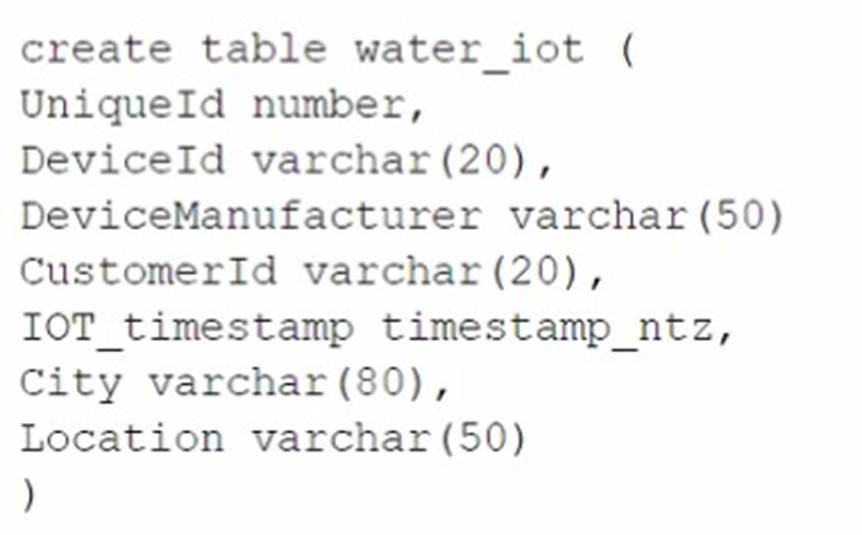
The general query patterns for the table are:
* 1. DeviceId, lOT_timestamp and Customerld are frequently used in the filter predicate for the select statement
* 2. The columns City and DeviceManuf acturer are often retrieved
* 3. There is often a count on Uniqueld
Which field(s) should be used for the clustering key?
Correct Answer:
C
A clustering key is a subset of columns or expressions that are used to co- locate the data in the same micro-partitions, which are the units of storage in Snowflake. Clustering can improve the performance of queries that filter on the clustering key columns, as it reduces the amount of data that needs to be scanned. The best choice for a clustering key depends on the query patterns and the data distribution in the table. In this case, the columns DeviceId, IOT_timestamp, and CustomerId are frequently used in the filter predicate for the select statement, which means they are good candidates for the clustering key. The columns City and DeviceManufacturer are often retrieved, but not filtered on, so they are not as important for the clustering key. The column UniqueId is used for counting, but it is not a good choice for the clustering key, as it is likely to have a high cardinality and a uniform distribution, which means it will not help to co-locate the data. Therefore, the best option is to use DeviceId and CustomerId as the clustering key, as they can help to prune the micro-partitions and speed up the queries. References: Clustering Keys & Clustered Tables, Micro-partitions & Data Clustering, A Complete Guide to Snowflake Clustering
Database DB1 has schema S1 which has one table, T1. DB1 --> S1 --> T1
The retention period of EG1 is set to 10 days. The retention period of s: is set to 20 days. The retention period of t: Is set to 30 days. The user runs the following command:
Drop Database DB1;
What will the Time Travel retention period be for T1?
Correct Answer:
C
The Time Travel retention period for T1 will be 30 days, which is the retention period set at the table level. The Time Travel retention period determines how long the historical data is preserved and accessible for an object after it is modified or dropped. The Time Travel retention period can be set at the account level, the database level, the schema level, or the table level. The retention period set at the lowest level of the hierarchy takes precedence over the higher levels. Therefore, the retention period set at the table level overrides the retention periods set at the schema level, the database level, or the account level. When the user drops the database DB1, the table T1 is also dropped,
but the historical data is still preserved for 30 days, which is the retention period set at the table level. The user can use the UNDROP command to restore the table T1 within the 30- day period. The other options are incorrect because:
✑ 10 days is the retention period set at the database level, which is overridden by the table level.
✑ 20 days is the retention period set at the schema level, which is also overridden by the table level.
✑ 37 days is not a valid option, as it is not the retention period set at any level. References:
✑ Understanding & Using Time Travel
✑ AT | BEFORE
✑ Snowflake Time Travel & Fail-safe
A large manufacturing company runs a dozen individual Snowflake accounts across its business divisions. The company wants to increase the level of data sharing to support supply chain optimizations and increase its purchasing leverage with multiple vendors.
The company??s Snowflake Architects need to design a solution that would allow the business divisions to decide what to share, while minimizing the level of effort spent on configuration and management. Most of the company divisions use Snowflake accounts in
the same cloud deployments with a few exceptions for European-based divisions.
According to Snowflake recommended best practice, how should these requirements be met?
Correct Answer:
D
According to Snowflake recommended best practice, the requirements of the large manufacturing company should be met by deploying a Private Data Exchange in combination with data shares for the European accounts. A Private Data Exchange is a feature of the Snowflake Data Cloud platform that enables secure and governed sharing of data between organizations. It allows Snowflake customers to create their own data hub and invite other parts of their organization or external partners to access and contribute data sets. A Private Data Exchange provides centralized management, granular access control, and data usage metrics for the data shared in the exchange1. A data share is a secure and direct way of sharing data between Snowflake accounts without having to copy or move the data. A data share allows the data provider to grant privileges on selected objects in their account to one or more data consumers in other accounts2. By using a Private Data Exchange in combination with data shares, the company can achieve the following benefits:
✑ The business divisions can decide what data to share and publish it to the Private
Data Exchange, where it can be discovered and accessed by other members of the exchange. This reduces the effort and complexity of managing multiple data sharing relationships and configurations.
✑ The company can leverage the existing Snowflake accounts in the same cloud
deployments to create the Private Data Exchange and invite the members to join. This minimizes the migration and setup costs and leverages the existing Snowflake features and security.
✑ The company can use data shares to share data with the European accounts that
are in different regions or cloud platforms. This allows the company to comply with the regional and regulatory requirements for data sovereignty and privacy, while still enabling data collaboration across the organization.
✑ The company can use the Snowflake Data Cloud platform to perform data analysis
and transformation on the shared data, as well as integrate with other data sources and applications. This enables the company to optimize its supply chain and increase its purchasing leverage with multiple vendors.
A company is designing high availability and disaster recovery plans and needs to maximize redundancy and minimize recovery time objectives for their critical application processes. Cost is not a concern as long as the solution is the best available. The plan so far consists of the following steps:
* 1. Deployment of Snowflake accounts on two different cloud providers.
* 2. Selection of cloud provider regions that are geographically far apart.
* 3. The Snowflake deployment will replicate the databases and account data between both cloud provider accounts.
* 4. Implementation of Snowflake client redirect.
What is the MOST cost-effective way to provide the HIGHEST uptime and LEAST application disruption if there is a service event?
Correct Answer:
D
To provide the highest uptime and least application disruption in case of a service event, the best option is to use the Business Critical Snowflake edition and connect the applications using the <organization_name>-<accountLocator> URL. The Business Critical Snowflake edition offers the highest level of security, performance, and availability for Snowflake accounts. It includes features such as customer-managed encryption keys, HIPAA compliance, and 4-hour RPO and RTO SLAs. It also supports account replication and failover across regions and cloud platforms, which enables business continuity and disaster recovery. By using the <organization_name>-<accountLocator> URL, the applications can leverage the Snowflake Client Redirect feature, which automatically redirects the client connections to the secondary account in case of a failover. This way, the applications can seamlessly switch to the backup account without any manual intervention or configuration changes. The other options are less cost-effective or less reliable because they either use a lower edition of Snowflake, which does not support account replication and failover, or they use the <organization_name>-<connection_name> URL, which does not support client redirect and requires manual updates to the connection string in case of a failover. References:
✑ [Snowflake Editions] 1
✑ [Replication and Failover/Failback] 2
✑ [Client Redirect] 3
✑ [Snowflake Account Identifiers] 4
A Data Engineer is designing a near real-time ingestion pipeline for a retail company to ingest event logs into Snowflake to derive insights. A Snowflake Architect is asked to define security best practices to configure access control privileges for the data load for auto- ingest to Snowpipe.
What are the MINIMUM object privileges required for the Snowpipe user to execute Snowpipe?
Correct Answer:
B
According to the SnowPro Advanced: Architect documents and learning resources, the minimum object privileges required for the Snowpipe user to execute Snowpipe are:
✑ OWNERSHIP on the named pipe. This privilege allows the Snowpipe user to
create, modify, and drop the pipe object that defines the COPY statement for loading data from the stage to the table1.
✑ USAGE and READ on the named stage. These privileges allow the Snowpipe user
to access and read the data files from the stage that are loaded by Snowpipe2.
✑ USAGE on the target database and schema. These privileges allow the Snowpipe user to access the database and schema that contain the target table3.
✑ INSERT and SELECT on the target table. These privileges allow the Snowpipe user to insert data into the table and select data from the table4.
The other options are incorrect because they do not specify the minimum object privileges required for the Snowpipe user to execute Snowpipe. Option A is incorrect because it does not include the READ privilege on the named stage, which is required for the Snowpipe user to read the data files from the stage. Option C is incorrect because it does not include the OWNERSHIP privilege on the named pipe, which is required for the Snowpipe user to create, modify, and drop the pipe object. Option D is incorrect because it does not include the OWNERSHIP privilege on the named pipe or the READ privilege on the named stage, which are both required for the Snowpipe user to execute Snowpipe. References
: CREATE PIPE | Snowflake Documentation, CREATE STAGE | Snowflake Documentation, CREATE DATABASE | Snowflake Documentation, CREATE TABLE | Snowflake Documentation
